Keyboard Shortcuts
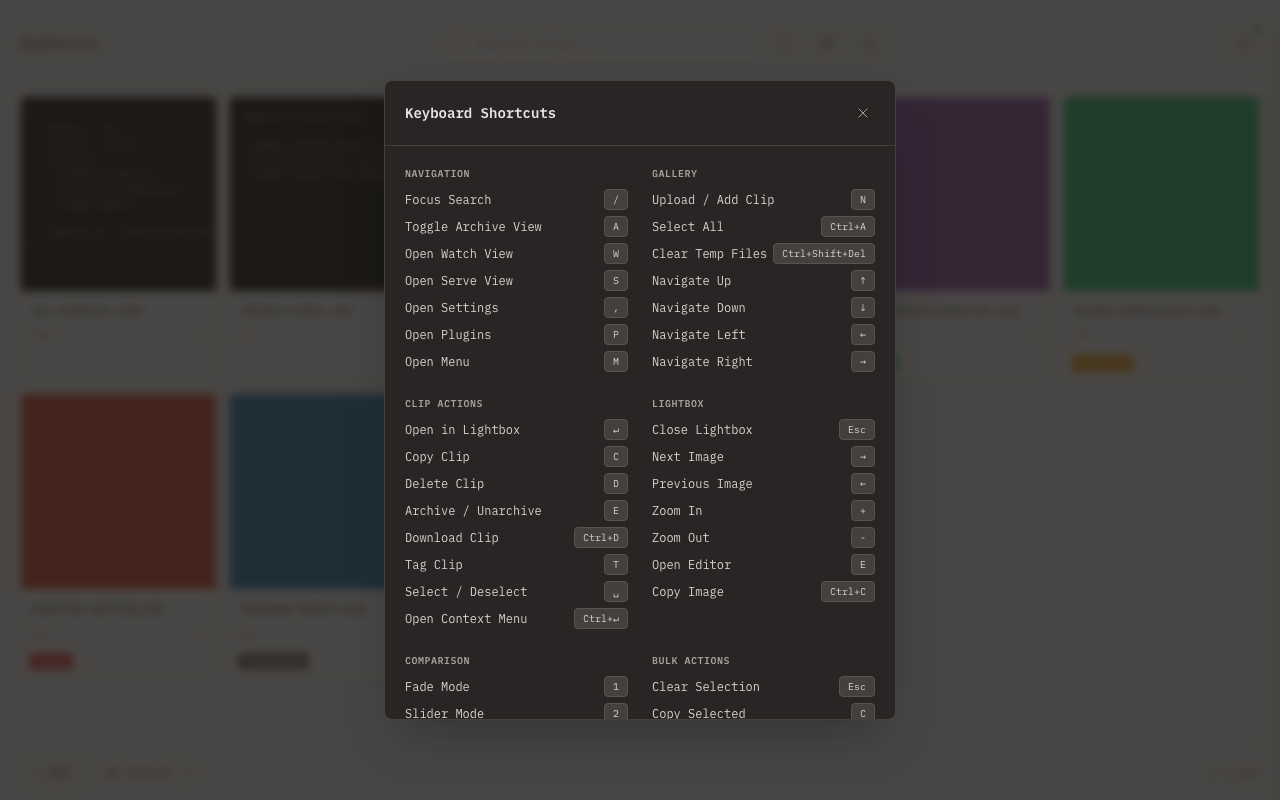
Complete reference for all keyboard shortcuts in mahpastes. Press ? at any time to open the built-in shortcut cheatsheet.
System
| Shortcut | Action |
|---|---|
| ? | Show keyboard shortcut cheatsheet |
| Esc | Close current modal, drawer, or cheatsheet |
| Cmd + V | Paste from system clipboard |
| Cmd + C | Copy (context-dependent, see below) |
Cmd+C Behavior
Cmd + C is context-dependent:
| Context | Action |
|---|---|
| Lightbox open | Copies clip contents (raw image or text) to clipboard |
| Clips selected in gallery | Copies selected clips as files to system clipboard |
| Text selected / input focused | Standard browser copy (not intercepted) |
Navigation
| Shortcut | Action |
|---|---|
| / | Focus search |
| A | Toggle archive view |
| F | Toggle folder mode |
| W | Open watch folders |
| , | Open settings |
| P | Open plugins |
| M | Open menu drawer |
| S | Open Serve View |
Gallery
| Shortcut | Action |
|---|---|
| N | Upload / add clip |
| Cmd + A | Select all |
| Cmd + Shift + Delete | Clear temp files |
| ↑ ↓ ← → | Navigate gallery grid |
Clip Actions
When a clip card has keyboard focus:
| Shortcut | Action |
|---|---|
| Enter | Open in lightbox |
| C | Copy clip as file |
| D | Delete clip |
| E | Archive / unarchive |
| Cmd + D | Download clip |
| T | Tag clip |
| Space | Select / deselect |
| Cmd + Enter | Open context menu |
Bulk Actions
When clips are selected:
| Shortcut | Action |
|---|---|
| Esc | Clear selection |
| C | Copy selected as files |
| Cmd + C | Copy selected as files |
| D | Delete selected |
| E | Archive selected |
| Cmd + D | Download selected |
| T | Tag selected |
| X | Set expiration |
Lightbox
When viewing a clip in the lightbox:
| Shortcut | Action |
|---|---|
| ← | Previous image |
| → | Next image |
| + | Zoom in |
| - | Zoom out |
| E | Open editor |
| Cmd + C | Copy clip contents |
| Esc | Close open menu first, then close lightbox |
| Tab / Shift + Tab | Cycle focus within lightbox buttons (focus trap) |
Lightbox Menus (File/Plugin)
When a dropdown menu is open inside the lightbox:
| Shortcut | Action |
|---|---|
| ↓ / ↑ | Navigate menu items |
| Esc | Close menu |
| Tab | Close menu |
Comparison Modal
When the image comparison modal is open:
| Shortcut | Action |
|---|---|
| 1 | Fade mode |
| 2 | Slider mode |
| 3 | Diff mode |
| S | Swap images |
| + | Zoom in |
| - | Zoom out |
| 0 | Fit to viewport |
| ← | Adjust range left |
| → | Adjust range right |
| Esc | Close comparison |
Image Editor
When the image editor is open:
| Shortcut | Action |
|---|---|
| B | Brush tool |
| E | Eraser tool |
| L | Line tool |
| W | Arrow tool |
| U | Rectangle tool |
| O | Circle tool |
| T | Text tool |
| I | Eyedropper tool |
| V | Select tool |
| X | Anonymize tool |
| C | Crop tool |
| R | Rotate 90° clockwise |
| Shift + R | Rotate 90° counter-clockwise |
| Cmd + Z | Undo last action |
| Cmd + Shift + Z | Redo undone action |
| Cmd + Y | Redo (alternative) |
| Cmd + A | Select all |
| Cmd + C | Copy selection |
| Cmd + V | Paste selection |
| Delete | Delete selection |
| Enter | Confirm crop or active selection |
| Cmd + S | Save As (create a new clip) |
| ] | Increase brush size |
| [ | Decrease brush size |
| } | Increase opacity |
| { | Decrease opacity |
| Esc | Cancel active selection/crop, or close editor |
Undo History
The image editor maintains up to 50 undo steps.
There is no default keyboard shortcut for the editor's in-place Save button.
Text Editor
| Shortcut | Action |
|---|---|
| Cmd/Ctrl + Shift + P | Toggle Preview/Edit (every recognized text clip) |
| Cmd/Ctrl + F | Open Find / Replace |
| ← / → | Switch Preview/Edit when the mode tabs are focused |
| Esc | Close the editor; confirms before discarding changes |
A custom binding for the old Markdown-only preview toggle migrates to the generalized Toggle Preview/Edit action automatically.
Text Placement (Editor)
| Shortcut | Action |
|---|---|
| Enter | Confirm text placement |
| Esc | Cancel text placement |
Drop Zone
| Shortcut | Action |
|---|---|
| Enter or Space | Open file picker (when drop zone is focused) |
Confirm Dialog
| Shortcut | Action |
|---|---|
| Tab / Shift + Tab | Cycle focus within dialog (focus trap) |
| Esc | Close dialog |
Plugin Modals
| Shortcut | Action |
|---|---|
| Esc | Close result modal first, then options modal, then plugins modal |
Common Workflows
Quick Workflow
- Cmd + V to paste
- Click to view/edit
- Esc to close and continue
Image Annotation Flow
- Open image editor
- Select a tool from the toolbar (Select, Crop, Brush, Eraser, Line, Arrow, Rectangle, Circle, Text, Anonymize, Eyedropper)
- Cmd + Z if you make a mistake
- Cmd + S to save as a new clip
Bulk Operations
- Click checkboxes to select multiple clips
- Use the action bar for bulk archive/delete/download
Customization
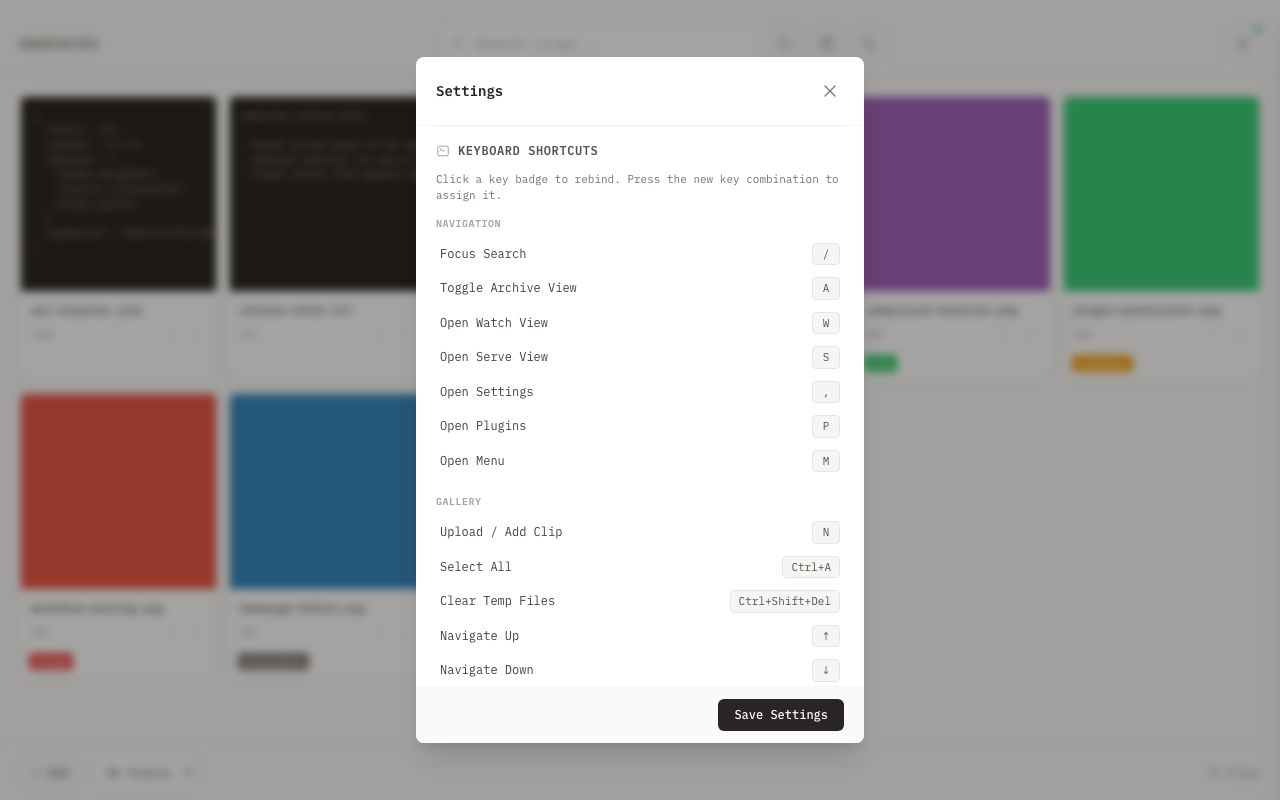
Customize shortcuts from Menu Drawer → Settings → Keyboard Shortcuts:
- Open the menu drawer with M (or click the menu button)
- Open Settings
- Scroll to Keyboard Shortcuts
- Click any shortcut key badge and press a new key combo
- Use Reset All to Defaults to revert all custom bindings