REST API
Expose clips and tags over an authenticated HTTP API for external tools, scripts, and integrations.
Overview
The REST API runs a separate HTTP server with key-based authentication. Every request requires a Bearer token. Keys have roles that control access, and can optionally be scoped to a single tag.
Base URL: http://127.0.0.1:{port}/api/v1
Content types:
- All JSON responses use
Content-Type: application/json - Errors return
{ "error": "message" } - CORS headers are set on all responses (
Access-Control-Allow-Origin: *)
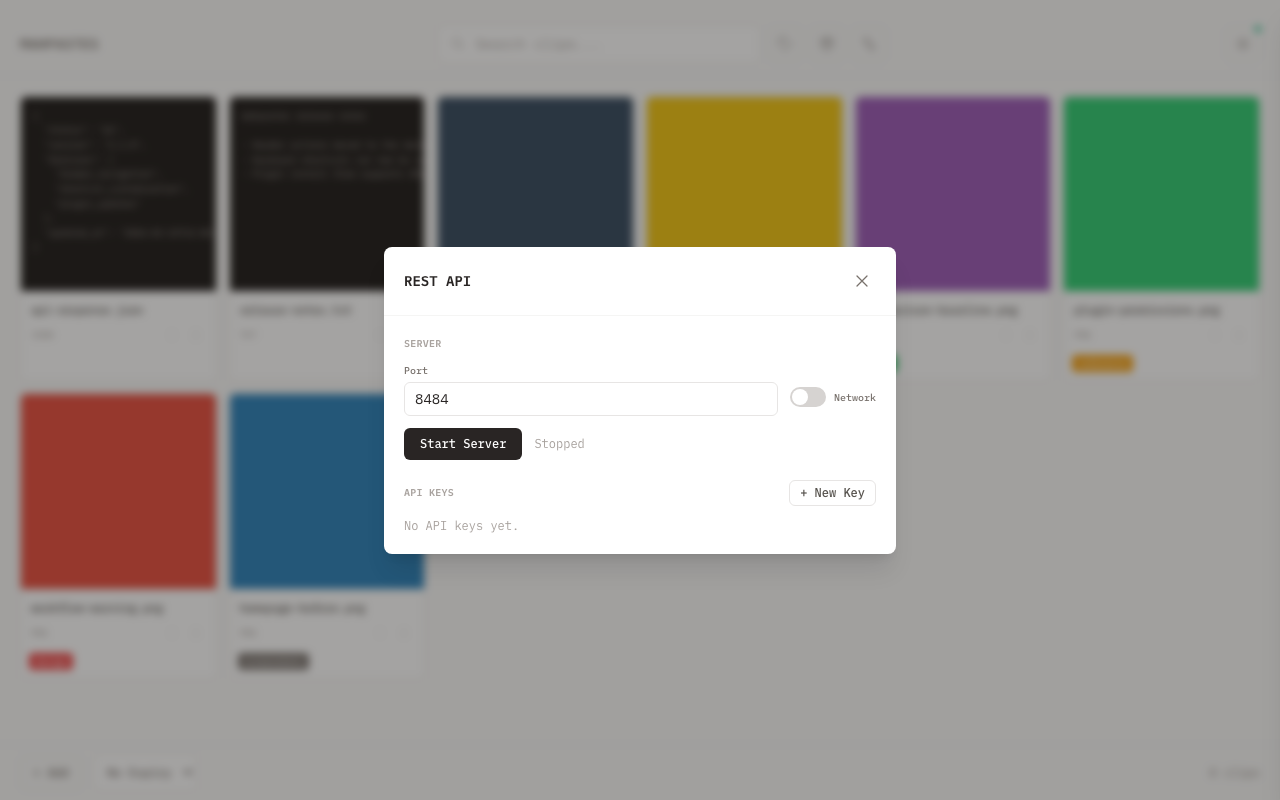
Starting the Server
- Open the menu drawer and click API (or the API button in settings)
- Set a port (default:
8484) - Optionally enable Network toggle to bind to
0.0.0.0instead of127.0.0.1 - Click Start Server
The status line shows the server URL and request count while running.
Stopping the Server
Click Stop Server in the API modal. The server shuts down gracefully with a 5-second timeout.
API Keys
Every request must include a valid API key. Keys are managed in the API modal.
Creating a Key
- Click + New Key
- Enter a name (e.g. "CI pipeline")
- Select a role: Viewer, Editor, or Admin
- Optionally select a tag scope to restrict the key to a single tag
- Click Create Key
The plaintext key is shown once. Copy it immediately -- it cannot be retrieved later. Keys are stored as SHA-256 hashes.
Keys are prefixed with mp_ (e.g. mp_a1b2c3d4e5f6...).
Revoking a Key
Click Revoke on any active key card and confirm in the dialog. The key stops working immediately — every request is re-checked against the database, so there is no cache to wait out.
Revoking is a soft delete: the key row is kept and shown grayed out with a Revoked badge, so you can still see that the key existed and when it was retired (hover the badge for the date). Seven days after revoking, the row is deleted for good by the same background cleanup job that removes expired clips, so the list doesn't accumulate dead keys forever.
Deleting a tag that a key was scoped to revokes that key automatically, on the same seven-day retention clock.
From the CLI, mp api key list shows revoked <date> in the status column for keys still inside the retention window.
Keys can also be created, listed, and revoked over the API itself — see API Keys in the endpoint reference.
Roles
| Role | Clips | Tags | Scope |
|---|---|---|---|
| viewer | List, get metadata, download data | List tags | Read-only |
| editor | All viewer permissions + create, delete, archive, unarchive, rename, expire, manage clip tags, metadata, clipboard | List tags | Read-write clips |
| admin | All editor permissions | Create, update, delete tags, manage watch folders, plugins, serve, backup, hidden tags, dedup-all | Full access |
Tag Scope
A key can be scoped to a single tag. When scoped, the key has access to the full subtree rooted at that tag -- the scoped tag itself plus all of its descendants.
Clip Access
- List clips returns clips tagged with the scoped tag or any of its subtags
- Get / download / delete a clip requires the clip to have the scoped tag or one of its subtags
- Create clip auto-applies the scoped tag to the new clip
Tag Management (Admin Role)
Scoped admin keys can manage tags within their subtree:
- Create tags -- can create new subtags under the scoped tag (e.g., a key scoped to
workcan creatework/client2) - Update tags -- can rename or recolor tags within the subtree
- Delete tags -- can delete tags within the subtree
- List tags returns the scoped tag and all of its descendants
Tags outside the subtree are not visible or modifiable.
Clip-Tag Association
- Add/remove tag on clip is restricted to tags within the scoped subtree
- The clip must also belong to the scoped subtree
Serve Management
- Scoped admin keys can start and stop serving for their scoped tag
- Attempting to serve a different tag returns
403 Forbidden - Serve management is restricted to the exact scoped tag, not its subtags
- List servers only returns servers for the scoped tag
Deduplication Restrictions
- List duplicates and deduplicate all are not available for tag-scoped keys and return
403 Forbidden - Merge duplicates enforces tag scope on the survivor clip
Unscoped keys (scope: "All tags") have access to all clips and tags within their role.
Authentication
Include the key as a Bearer token:
Authorization: Bearer mp_a1b2c3d4e5f67890abcdef1234567890
Missing or invalid tokens return 401 Unauthorized. Insufficient role returns 403 Forbidden.
Endpoint Reference
All paths below are relative to /api/v1.
Clips
| Method | Path | Min Role | Description |
|---|---|---|---|
GET | /clips | viewer | List clips (paginated, filterable) |
GET | /clips/hidden-info | viewer | Count clips a filter matched but hidden tags withheld |
GET | /clips/{id} | viewer | Get clip metadata |
GET | /clips/{id}/data | viewer | Download raw clip content |
POST | /clips | editor | Upload a new clip |
DELETE | /clips/{id} | editor | Delete a clip |
PUT | /clips/{id}/archive | editor | Archive a clip |
DELETE | /clips/{id}/archive | editor | Unarchive a clip |
PATCH | /clips/{id} | editor | Rename a clip |
PUT | /clips/{id}/expiration | editor | Set expiration timer |
DELETE | /clips/{id}/expiration | editor | Cancel expiration |
List clips
GET /api/v1/clips
Query parameters:
| Parameter | Type | Default | Description |
|---|---|---|---|
limit | int | 50 | Results per page (max 200) |
offset | int | 0 | Pagination offset |
tag | int | -- | Filter by tag ID |
content_type | string | -- | Filter by exact content type |
archived | bool | -- | Filter by archive status (true / false) |
search | string | -- | Search filename and text content |
Response:
{
  "clips": [
    {
      "id": 1,
      "filename": "screenshot.png",
      "content_type": "image/png",
      "size": 204800,
      "is_archived": false,
      "created_at": "2025-01-15T10:30:00Z",
      "tags": [{ "id": 3, "name": "work", "color": "#e74c3c", "count": 5 }]
    }
  ],
  "total": 42,
  "limit": 50,
  "offset": 0
}
Hidden clip info
GET /api/v1/clips/hidden-info
Takes the same tag, hidden, and archived parameters as list clips, and reports the
clips those filters matched that the hidden-tag anti-join removed from the listing — so a
UI can say why a filtered gallery looks emptier than expected.
{ "count": 2, "tags": ["web/contacts"] }
tags names only the hidden tags actually responsible. Tag-scoped keys are confined to
their own subtree, as with list clips.
Get clip metadata
GET /api/v1/clips/{id}
Returns a single clip object with id, filename, content_type, size, created_at, is_archived, and tags.
Download clip data
GET /api/v1/clips/{id}/data
Returns the raw file bytes with the clip's original content type, Content-Length, and Content-Disposition headers. The Content-Disposition header is set to attachment with the clip's filename when available.
Upload a clip
POST /api/v1/clips
Content-Type: multipart/form-data
Send a file part in the multipart body (100 MB max). Optional ?filename= query parameter overrides the uploaded filename.
Returns 201 Created with the clip object on success.
Duplicate uploads (matching content hash) return the existing clip instead of creating a new one. When a tag-scoped key uploads a duplicate, the scoped tag is applied to the existing clip.
Delete a clip
DELETE /api/v1/clips/{id}
Returns 204 No Content on success.
Archive / Unarchive
PUT    /api/v1/clips/{id}/archive     # Archive
DELETE /api/v1/clips/{id}/archive     # Unarchive
Returns 204 No Content on success.
Rename a clip
PATCH /api/v1/clips/{id}
Content-Type: application/json
{ "filename": "new-name.png" }
Returns 204 No Content on success.
Set / Cancel expiration
PUT /api/v1/clips/{id}/expiration
Content-Type: application/json
{ "minutes": 60 }
The clip is automatically deleted after the specified number of minutes. The minutes value must be positive.
DELETE /api/v1/clips/{id}/expiration
Cancels a pending expiration. Returns 204 No Content.
Clip Metadata
| Method | Path | Min Role | Description |
|---|---|---|---|
GET | /clips/{id}/metadata | viewer | Get all metadata key-value pairs |
PUT | /clips/{id}/metadata | editor | Replace all metadata |
PUT | /clips/{id}/metadata/{key} | editor | Set a single metadata value |
DELETE | /clips/{id}/metadata/{key} | editor | Delete a single metadata key |
Get all metadata
GET /api/v1/clips/{id}/metadata
Returns a JSON object of key-value pairs: {"source": "screenshot", "project": "docs"}.
Replace all metadata
PUT /api/v1/clips/{id}/metadata
Content-Type: application/json
{ "source": "screenshot", "project": "docs" }
Atomically replaces all existing metadata with the provided pairs. Returns 204 No Content.
Set a single key
PUT /api/v1/clips/{id}/metadata/{key}
Content-Type: application/json
{ "value": "screenshot" }
Returns 204 No Content.
Delete a single key
DELETE /api/v1/clips/{id}/metadata/{key}
Returns 204 No Content.
Clip-Tag Association
| Method | Path | Min Role | Description |
|---|---|---|---|
PUT | /clips/{id}/tags/{tagId} | editor | Assign a tag to a clip |
DELETE | /clips/{id}/tags/{tagId} | editor | Remove a tag from a clip |
Returns 204 No Content on success.
Assigning a tag automatically removes any existing tags from the same root tree. For example, adding work/client2 removes work/client1 if both share the work root.
Bulk Operations
All bulk endpoints accept a JSON body with an ids array. Minimum role is editor unless noted.
| Method | Path | Min Role | Description |
|---|---|---|---|
POST | /clips/bulk/delete | editor | Delete multiple clips |
POST | /clips/bulk/archive | editor | Archive multiple clips |
POST | /clips/bulk/unarchive | editor | Unarchive multiple clips |
POST | /clips/bulk/expire | editor | Set expiration on multiple clips |
POST | /clips/bulk/cancel-expire | editor | Cancel expiration on multiple clips |
POST | /clips/bulk/tag | editor | Add a tag to multiple clips |
POST | /clips/bulk/untag | editor | Remove a tag from multiple clips |
POST | /clips/bulk/download | viewer | Download multiple clips as a ZIP |
POST | /clips/bulk/copy | editor | Copy clip files to system clipboard |
Request bodies
Delete / Archive / Unarchive / Cancel-expire:
{ "ids": [1, 2, 3] }
Expire:
{ "ids": [1, 2, 3], "minutes": 60 }
Tag / Untag:
{ "ids": [1, 2, 3], "tag_id": 5 }
Download:
{ "ids": [1, 2, 3] }
Returns an application/zip response containing the clip files.
Copy:
{ "ids": [1, 2, 3] }
Copies the clip files to the system clipboard. Returns 204 No Content.
Response bodies
Most bulk operations return a JSON object with the count of affected items:
| Endpoint | Response |
|---|---|
bulk/delete | { "deleted": 3 } |
bulk/archive | { "archived": 3 } |
bulk/unarchive | { "unarchived": 3 } |
bulk/expire | { "updated": 3 } |
bulk/cancel-expire | { "updated": 3 } |
bulk/tag | { "tagged": 3 } |
bulk/untag | { "untagged": 3 } |
bulk/download | Binary ZIP file |
bulk/copy | 204 No Content |
Tags
| Method | Path | Min Role | Description |
|---|---|---|---|
GET | /tags | viewer | List all tags |
POST | /tags | admin | Create a tag |
PUT | /tags/{id} | admin | Update tag name and color |
DELETE | /tags/{id} | admin | Delete a tag |
GET | /tags/{id}/children | viewer | List direct child tags |
GET | /tags/{id}/clips | viewer | List clips with this tag |
GET | /tags/hidden | viewer | Get hidden tag IDs |
PUT | /tags/hidden | admin | Set hidden tag IDs |
List tags
GET /api/v1/tags
Returns an array of tag objects, each with id, name, color, and count (number of clips using the tag). Tag-scoped keys only see their scoped tag and its descendants.
Create a tag
POST /api/v1/tags
Content-Type: application/json
{ "name": "work/client1" }
Use / separators to create hierarchical tags. Parent tags are created automatically if they don't exist. Returns 201 Created with the new tag object.
Tag names cannot contain _api as a path segment. See Tag Serve for details.
Update a tag
PUT /api/v1/tags/{id}
Content-Type: application/json
{ "name": "work/client2", "color": "#e74c3c" }
Returns 204 No Content.
Delete a tag
DELETE /api/v1/tags/{id}
Returns 204 No Content. Deleting a parent tag does not delete its children.
List child tags
GET /api/v1/tags/{id}/children
Returns an array of direct child tags (one level deep).
List clips for a tag
GET /api/v1/tags/{id}/clips
Query parameters:
| Parameter | Type | Default | Description |
|---|---|---|---|
limit | int | 50 | Results per page (max 200) |
offset | int | 0 | Pagination offset |
Returns a paginated clip list in the same envelope format as List clips:
{ "clips": [...], "total": 12, "limit": 50, "offset": 0 }
Get / Set hidden tags
GET /api/v1/tags/hidden
Returns { "ids": [1, 2] }.
PUT /api/v1/tags/hidden
Content-Type: application/json
{ "ids": [1, 2] }
Replaces the full list of hidden tag IDs. Returns 204 No Content.
Deduplication
| Method | Path | Min Role | Description |
|---|---|---|---|
GET | /dedup | viewer | List duplicate groups |
POST | /dedup/{clipId}/merge | editor | Merge duplicates (keeps specified clip) |
POST | /dedup/all | admin | Deduplicate all groups at once |
Listing duplicates and deduplicating all are not available for tag-scoped keys. These endpoints return 403 Forbidden when called with a scoped key.
List duplicates
GET /api/v1/dedup
Returns duplicate groups. Each group contains clips that share the same content hash.
{
  "groups": [
    {
      "content_hash": "abc123...",
      "filename": "screenshot.png",
      "content_type": "image/png",
      "count": 3,
      "oldest_id": 1
    }
  ],
  "total": 2
}
Merge duplicates
POST /api/v1/dedup/{clipId}/merge
Keeps the specified clip as the survivor. Tags from all duplicates are merged onto it, then the duplicates are deleted. Returns 204 No Content.
Deduplicate all
POST /api/v1/dedup/all
Iterates over all duplicate groups and merges each one, keeping the oldest clip in each group.
{ "removed": 5 }
Watch Folders
| Method | Path | Min Role | Description |
|---|---|---|---|
GET | /watch | viewer | List watch folders |
GET | /watch/status | viewer | Get watch system status |
GET | /watch/{id} | viewer | Get a specific folder |
POST | /watch | admin | Add a watch folder |
PUT | /watch/{id} | admin | Update folder config |
DELETE | /watch/{id} | admin | Remove a folder |
PUT | /watch/{id}/pause | admin | Pause a folder |
DELETE | /watch/{id}/pause | admin | Resume a folder |
POST | /watch/{id}/process | admin | Process existing files |
PUT | /watch/global-pause | admin | Pause all watchers |
DELETE | /watch/global-pause | admin | Resume all watchers |
List watch folders
GET /api/v1/watch
Returns all configured watch folders:
{
  "folders": [
    {
      "id": 1,
      "path": "/Users/me/Screenshots",
      "filter_mode": "presets",
      "filter_presets": ["images"],
      "filter_regex": "",
      "process_existing": false,
      "auto_archive": false,
      "auto_tag_id": 5,
      "is_paused": false,
      "created_at": "2025-01-15T10:30:00Z",
      "exists": true
    }
  ],
  "total": 1
}
Add a watch folder
POST /api/v1/watch
Content-Type: application/json
{
  "path": "/Users/me/Screenshots",
  "filter_mode": "presets",
  "filter_presets": ["images"],
  "filter_regex": "",
  "auto_tag_id": 5,
  "auto_archive": false,
  "process_existing": false
}
| Field | Type | Description |
|---|---|---|
path | string | Absolute path to the folder (required) |
filter_mode | string | "all", "presets", or "custom" |
filter_presets | string[] | Preset names when filter_mode is "presets" (e.g. ["images", "videos", "documents"]) |
filter_regex | string | Regex pattern when filter_mode is "custom" |
auto_tag_id | int | Tag ID to auto-apply to imports (null or 0 for none) |
auto_archive | bool | Auto-archive imported files |
process_existing | bool | Import existing files in the folder immediately |
Returns 201 Created with the folder object. When process_existing is true, the import runs in the background after the folder is created.
Update a watch folder
PUT /api/v1/watch/{id}
Content-Type: application/json
Supports partial updates -- only include the fields you want to change. Omitted fields keep their current values.
{ "filter_mode": "all", "auto_archive": true }
Returns 204 No Content.
Pause / Resume a folder
PUT    /api/v1/watch/{id}/pause    # Pause
DELETE /api/v1/watch/{id}/pause    # Resume
Returns 204 No Content.
Global pause / resume
PUT    /api/v1/watch/global-pause    # Pause all
DELETE /api/v1/watch/global-pause    # Resume all
Returns 204 No Content.
Process existing files
POST /api/v1/watch/{id}/process
Triggers a one-time scan of all existing files in the folder. Returns 204 No Content.
Plugins
| Method | Path | Min Role | Description |
|---|---|---|---|
GET | /plugins | viewer | List installed plugins |
GET | /plugins/actions | viewer | List all plugin UI actions |
POST | /plugins | admin | Install a plugin |
POST | /plugins/check-updates | admin | Check for available updates |
DELETE | /plugins/{id} | admin | Remove a plugin |
PUT | /plugins/{id}/enable | admin | Enable a plugin |
PUT | /plugins/{id}/disable | admin | Disable a plugin |
GET | /plugins/{id}/storage | admin | Get all plugin storage |
GET | /plugins/{id}/storage/{key} | admin | Get a storage value |
PUT | /plugins/{id}/storage/{key} | admin | Set a storage value |
POST | /plugins/{id}/actions/{actionId} | editor | Execute a plugin action |
POST | /plugins/{id}/update | admin | Update a plugin |
List plugins
GET /api/v1/plugins
Returns all installed plugins:
{
  "plugins": [
    {
      "id": 1,
      "name": "fal-ai",
      "version": "1.0.0",
      "description": "FAL.AI image processing",
      "author": "mahpastes",
      "enabled": true,
      "status": "loaded",
      "events": ["clip:created"],
      "settings": []
    }
  ],
  "total": 1
}
Install a plugin
POST /api/v1/plugins
Content-Type: application/json
Pass a URL or local file path in the source field:
{ "source": "https://example.com/plugin.lua" }
{ "source": "/Users/me/plugins/my-plugin.lua" }
Returns 201 Created with the plugin info object.
Remove a plugin
DELETE /api/v1/plugins/{id}
Returns 204 No Content.
Enable / Disable
PUT /api/v1/plugins/{id}/enable
PUT /api/v1/plugins/{id}/disable
Returns 204 No Content.
Plugin storage
GET /api/v1/plugins/{id}/storage
Returns all key-value pairs for the plugin.
GET /api/v1/plugins/{id}/storage/{key}
Returns { "key": "...", "value": "..." }.
PUT /api/v1/plugins/{id}/storage/{key}
Content-Type: application/json
{ "value": "my-api-key-here" }
Returns 204 No Content.
Execute a plugin action
POST /api/v1/plugins/{id}/actions/{actionId}
Content-Type: application/json
{ "clip_ids": [42], "options": { "style": "watercolor" } }
Pass clip_ids to identify the target clip(s) and options for any form fields defined in the action manifest. Both fields are optional.
Check for updates
POST /api/v1/plugins/check-updates
Returns update availability info for all installed plugins:
{ "updates": [...] }
Update a plugin
POST /api/v1/plugins/{id}/update
Downloads and installs the latest version from the plugin's source URL.
Serve (Tag Hosting)
| Method | Path | Min Role | Description |
|---|---|---|---|
GET | /serve | viewer | List running tag servers |
POST | /serve | admin | Start serving a tag |
DELETE | /serve/{tagId} | admin | Stop serving a tag |
List servers
GET /api/v1/serve
Returns all running tag servers. Tag-scoped keys only see servers for their scoped tag.
{
  "servers": [
    {
      "tag_id": 5,
      "tag_name": "my-site",
      "port": 44557,
      "bind_all": false,
      "url": "http://127.0.0.1:44557",
      "running": true,
      "request_count": 42,
      "api_access": "readwrite"
    }
  ]
}
Start serving
POST /api/v1/serve
Content-Type: application/json
{
  "tag_id": 5,
  "port": 0,
  "bind_all": false,
  "api_access": "none"
}
| Field | Type | Description |
|---|---|---|
tag_id | int | ID of the tag to serve (required) |
port | int | Port number, or 0 to auto-assign |
bind_all | bool | Bind to 0.0.0.0 instead of 127.0.0.1 |
api_access | string | "none" (default), "read", or "readwrite" -- controls the JSON API |
- Returns
201 Createdwith server info on success - Returns
409 Conflictif the tag is already being served or the port is unavailable
Tag-scoped admin keys can start and stop servers for their own scoped tag. They receive 403 Forbidden only when attempting to serve a different tag.
Stop serving
DELETE /api/v1/serve/{tagId}
Returns 204 No Content. Returns 404 if no server is running for that tag.
Backup
| Method | Path | Min Role | Description |
|---|---|---|---|
GET | /backup | admin | Download a backup ZIP |
POST | /backup/restore | admin | Restore from a backup ZIP |
Download backup
GET /api/v1/backup
Returns an application/zip file containing the full database and all clip data.
Restore from backup
POST /api/v1/backup/restore
Content-Type: multipart/form-data
Upload a backup ZIP file as a multipart form. This replaces the current database and clip data.
Returns { "status": "restored" } on success.
Clipboard
| Method | Path | Min Role | Description |
|---|---|---|---|
POST | /clipboard/copy | editor | Copy clip content to system clipboard |
POST | /clipboard/copy-file | editor | Copy clip as a file reference |
Copy content
POST /api/v1/clipboard/copy
Content-Type: application/json
{ "clip_id": 1 }
Copies the clip's raw content (text or image data) to the system clipboard. Returns 204 No Content.
Copy as file
POST /api/v1/clipboard/copy-file
Content-Type: application/json
{ "clip_id": 1 }
Places a file reference on the system clipboard (macOS: NSPasteboard file URL, Windows: PowerShell SetFileDropList). You can then paste the clip as a file into Finder, Explorer, or other apps. Returns 204 No Content.
API Keys
| Method | Path | Min Role | Description |
|---|---|---|---|
POST | /keys | admin | Create a key, returning the plaintext once |
GET | /keys | admin | List all keys (active and revoked) |
DELETE | /keys/{id} | admin | Revoke a key |
GET | /status | none | Server liveness (no authentication) |
Key management is gated on role only — it is not confined by tag scope. A tag-scoped admin key can mint further keys, including unscoped ones. Treat any admin key as full access to the instance, and prefer viewer or editor for scoped, delegated access.
Create a key
POST /api/v1/keys
Content-Type: application/json
{ "name": "CI pipeline", "role": "editor", "scoped_tag_id": 3 }
| Field | Required | Description |
|---|---|---|
name | Yes | Human-readable label; must not be blank |
role | No | viewer (default), editor, or admin |
scoped_tag_id | No | Restrict the key to this tag and its subtree; omit or 0 for unscoped |
Returns 201 Created:
{
  "key": "mp_a1b2c3d4e5f6a7b8c9d0e1f2a3b4c5d6",
  "info": {
    "id": 7,
    "name": "CI pipeline",
    "key_prefix": "mp_a1b2...",
    "role": "editor",
    "scoped_tag_id": 3,
    "scoped_tag_name": "work/client1",
    "is_revoked": false
  }
}
key is the only time the plaintext is returned — only its SHA-256 hash is stored. An unknown scoped_tag_id, a blank name, or a role outside the three valid values returns 400 Bad Request.
List keys
GET /api/v1/keys
Returns every key, newest first, active and revoked alike. Raw keys are never included — key_prefix holds the first 8 characters for identification.
[
  {
    "id": 7,
    "name": "CI pipeline",
    "key_prefix": "mp_a1b2...",
    "role": "editor",
    "scoped_tag_id": 3,
    "scoped_tag_name": "work/client1",
    "is_revoked": false,
    "created_at": "2026-07-29 09:12:44",
    "last_used_at": "2026-07-29 11:03:07",
    "revoked_at": null
  }
]
last_used_at is null until the key authenticates a request, and is stamped on every subsequent one. revoked_at is null for active keys; for revoked keys it is when the retention clock started (see Revoking a Key).
Revoke a key
DELETE /api/v1/keys/{id}
Returns 204 No Content. A key that does not exist, or that was already revoked, returns 404 Not Found — revoking is not idempotent.
Revocation takes effect on the next request: authentication re-checks is_revoked in SQL every time, with no cached key state. The row itself survives for 7 days so the revocation stays visible in listings.
Server status
GET /api/v1/status
The one unauthenticated endpoint, for liveness checks:
{ "running": true, "port": 44557, "bind_all": false, "url": "http://127.0.0.1:44557", "request_count": 128 }
It exposes no clip, tag, or key data. Note that mp api status does not use this route — it makes an authenticated GET /clips?limit=1 so that it also validates the key.
Error Responses
All errors return JSON with an error field:
{ "error": "clip not found" }
Common status codes:
| Status | Meaning |
|---|---|
400 | Bad request (invalid JSON, missing fields) |
401 | Missing or invalid API key |
403 | Insufficient role or tag scope violation |
404 | Resource not found |
409 | Conflict (duplicate, port in use) |
413 | Request body too large |
500 | Internal server error |
Related
- Tag Serve -- unauthenticated file serving for quick sharing, plus JSON API and file upload for served HTML apps
- Tags -- create and manage tags used for scoping
- CLI (
mp) -- command-line interface that wraps this REST API