Tag Serve
Serve the clips in a tag as files over a local HTTP server.
Overview
Tag serve starts a per-tag HTTP server that exposes every non-archived clip in that tag as a downloadable file. Each tag gets its own server on a random available port. Requests are served directly from the database -- no files are written to disk.
All responses include CORS headers (Access-Control-Allow-Origin: *) so the served content is accessible from any origin, including the Wails webview. The server also handles OPTIONS preflight requests, returning the allowed methods and headers with a 204 No Content status.
Use cases:
- Preview a collection of images or HTML files in a browser
- Share files with another device on the same network
- Feed a local tool or script with clip data over HTTP
Starting a Server
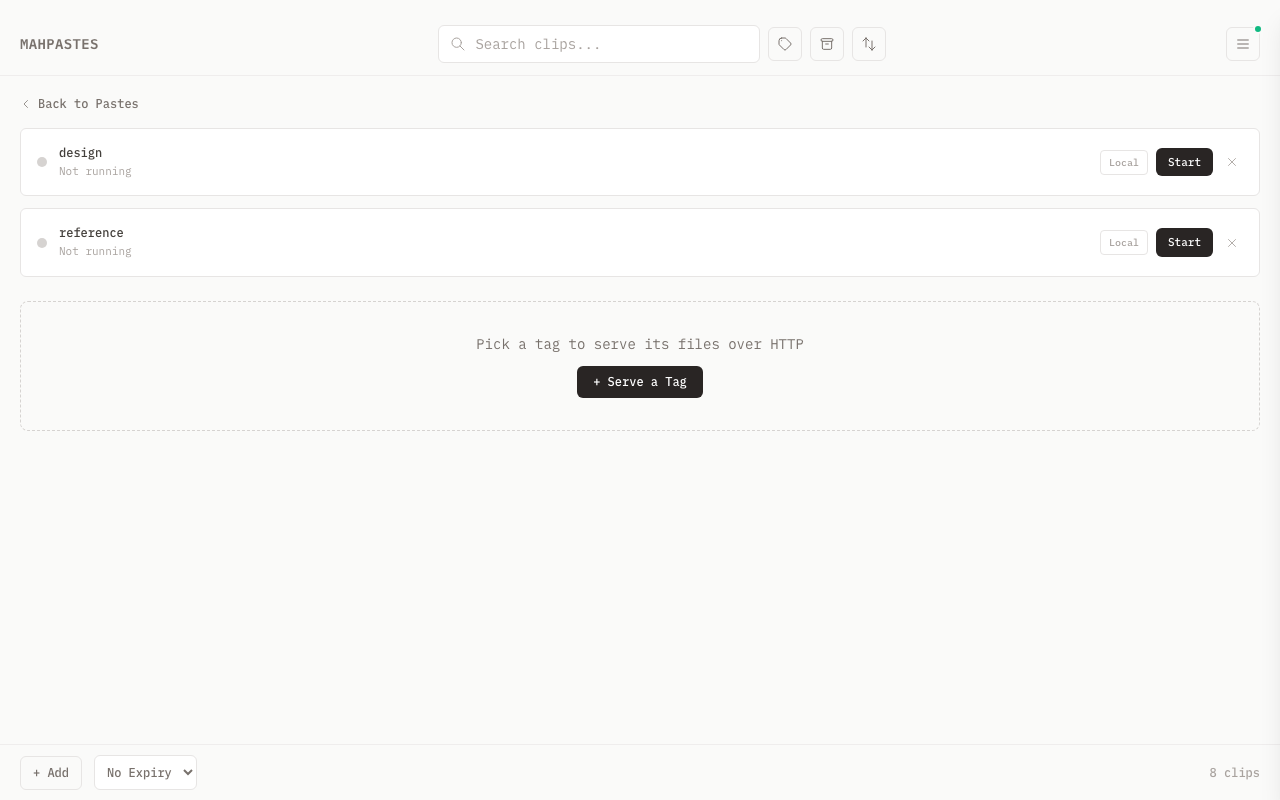
- Open the menu drawer and click Serve
- Click + Serve a Tag
- Pick a tag from the dropdown
- Click Start on the tag card
mahpastes allocates a random available port and starts the server immediately. The URL appears on the card and can be clicked to copy it.
Stopping a Server
Click Stop on a running tag card. The port is released and the URL becomes inactive. The tag stays in the serve list so it can be restarted later.
To remove a tag from the serve list entirely, stop the server first, then click the X button.
Bind Mode
Each tag server can run in one of two modes, toggled with the Local / Network button on the card:
| Mode | Bind address | Access |
|---|---|---|
| Local | 127.0.0.1 | Only this machine |
| Network | 0.0.0.0 | Any device on the network |
The bind mode can only be changed while the server is stopped.
Served Content
Directory Listing
Browsing the root URL returns a directory listing of all non-archived clips in the tag, ordered by creation date. The listing includes filename, content type, and human-readable file size.
The response format depends on the Accept header:
| Accept header | Response |
|---|---|
application/json | JSON array of { name, size, content_type, type } objects |
| anything else | Styled HTML page with a file table |
File Access
Each file is accessible at /<filename>. The server sets the correct Content-Type and Content-Length headers. Clips without a filename are served as clip-<id>.
index.html
If the tag contains a clip named index.html, requesting / or /index.html serves that clip directly instead of the directory listing. All other files remain accessible by name.
Duplicate Filenames
When multiple clips share the same filename, duplicates get a numbered suffix: photo.png, photo (2).png, photo (3).png.
Subtag Folder Navigation
When a served tag has subtags, the directory listing includes subtag folders alongside clip files. This mirrors the subtag hierarchy as a navigable directory structure.
URL Structure
/-- shows clips directly tagged with the served tag, plus a folder entry for each immediate subtag/client1/-- navigates into theclient1subtag, showing its clips and any deeper subtag folders/client1/projectABC/-- navigates further down the tree
Path segments in the URL resolve to subtags by name. For example, if you are serving the tag work, then /client1/ resolves to the subtag work/client1.
Directory Listing Format
Each entry in the directory listing includes a type field:
| Type | Description |
|---|---|
"file" | A clip served as a downloadable file |
"directory" | A subtag folder that can be navigated into |
JSON response (when Accept: application/json):
[
  { "name": "client1", "type": "directory" },
  { "name": "report.pdf", "size": 204800, "content_type": "application/pdf", "type": "file" }
]
Directory entries appear first, followed by file entries. Directory entries have size: 0 and an empty content_type.
HTML response shows folder icons next to directory entries to distinguish them from files.
index.html Scoping
The index.html override is scoped per level. If work/client1 has a clip named index.html, requesting /client1/ serves that clip. The root-level index.html (on the work tag itself) is unaffected.
JSON API
Serve a tag's JSON clips as a RESTful API that HTML pages in the same tag can read and write.
Enabling the API
When starting a tag server, select an API access level:
| Level | Description |
|---|---|
| No API | /_api returns 404 (default) |
| API Read | GET only — HTML can read JSON data |
| API R/W | Full CRUD — HTML can read, create, update, and delete |
The access level can only be changed while the server is stopped.
Authentication
When the API is enabled, the tag server sets an HTTP-only SameSite=Strict cookie (_mp_serve_key) on every response -- including normal file and directory responses, not only /_api calls. This means any HTML page loaded from the tag server automatically receives the cookie on first load, so subsequent fetch() calls to /_api/ work with credentials: 'include'.
The cookie value is a random 32-byte hex token generated when the server starts. It is validated with constant-time comparison.
Requests to /_api without a valid cookie receive 401 Unauthorized.
URL Structure
/_api/{clipName}/{jsonPath...}
{clipName}maps to a clip named{clipName}.jsonin the tag{jsonPath}navigates into the JSON structure by key (objects) or byidfield (arrays)
HTTP Methods
| Method | Path | Status | Response body | Behavior |
|---|---|---|---|---|
GET | /_api/users | 200 | JSON value | Return full contents of users.json |
GET | /_api/users/3 | 200 | JSON value | Return array element where id is 3 |
POST | /_api/users | 201 | Created object | Append to array, auto-assign id |
PUT | /_api/users/3 | 200 | Replaced value | Replace element with id 3 |
PATCH | /_api/users/3 | 200 | Merged object | Merge fields into element (RFC 7396) |
DELETE | /_api/users/3 | 204 | (empty) | Remove element from array |
DELETE | /_api/users | 400 | Error | Cannot delete root -- use PUT to replace |
PUT | /_api/config/theme | 200 | Replaced value | Set nested key in config.json |
Path Navigation
The {jsonPath} portion of the URL navigates into the JSON structure at arbitrary depth:
- Object keys -- each segment resolves to a key in a JSON object (e.g.,
/_api/config/ui/themenavigates intoconfig.json>ui>theme) - Array elements -- numeric segments match the
idfield of objects inside an array (e.g.,/_api/users/3finds the element whereidis 3)
You can combine both in a single path to reach deeply nested values. For example, given a project.json clip:
{
  "teams": [
    {
      "id": 1,
      "name": "Engineering",
      "members": [
        { "id": 10, "name": "Alice", "role": "lead" },
        { "id": 11, "name": "Bob", "role": "dev" }
      ]
    }
  ]
}
/_api/project/teams/1-- returns the Engineering team object/_api/project/teams/1/name-- returns"Engineering"/_api/project/teams/1/members/10-- returns Alice's object/_api/project/teams/1/members/10/role-- returns"lead"
Each segment alternates between object key lookup and array id lookup depending on the type encountered at that level.
Method Behavior
POST appends to an array and auto-assigns an id field (max existing id + 1). The request body must be a JSON object -- arrays and primitives are rejected with 400 Bad Request. The target at the given path must also be an array, or the server returns 400.
PUT replaces the value at the given path. When the path does not fully exist, intermediate objects are created automatically (upsert). For example, PUT /_api/config/ui/theme with body "dark" creates the ui object inside config.json if it is missing, then sets theme on it. This works at any depth -- every missing key along the path becomes a new empty object. When replacing an array element by id, the id field is preserved on the new object.
PATCH applies a JSON Merge Patch (RFC 7396). The request body and the target value at the given path must both be JSON objects -- if either is an array or a primitive, the server returns 400 Bad Request. Key behaviors:
- Present keys overwrite the existing value
- Keys set to
nullare deleted from the target (not set tonull-- the key is removed entirely) - Nested objects are merged recursively -- if both the existing value and the patch value for a key are objects, PATCH recurses into them instead of replacing
For example, given {"a": 1, "b": 2, "c": {"x": 10}}, a PATCH body of {"b": null, "c": {"y": 20}} produces {"a": 1, "c": {"x": 10, "y": 20}} -- b is removed and c is merged.
DELETE removes a key from an object or an element from an array. Deleting the root path (e.g., DELETE /_api/users with no further path) returns 400 Bad Request with the message "cannot delete root -- use PUT to replace". Target a specific key or element instead.
Concurrency
Each JSON clip has its own mutex. When a write request (POST, PUT, PATCH, DELETE) arrives, the server acquires the mutex for that clip's filename before reading, modifying, and writing back the data. This means:
- Concurrent writes to the same clip are serialized -- they execute one at a time in arrival order
- Concurrent writes to different clips in the same tag run in parallel with no contention
- GET requests do not acquire the mutex and are never blocked
Error Responses
All JSON API errors return a JSON body with a single error key containing a human-readable message:
{ "error": "clip not found: users.json" }
The Content-Type header on error responses is application/json. CORS headers (Access-Control-Allow-Origin: *) are included on error responses as well.
| Status | Meaning |
|---|---|
400 | Invalid request -- missing clip name, non-object POST/PATCH body, non-object PATCH target, non-array POST target, or attempting to delete root |
401 | Missing or invalid auth cookie |
403 | API is in read-only mode and a write method was attempted |
404 | Clip not found, or key/element not found at the given path |
405 | HTTP method not supported |
Example
Given a clip named todos.json containing:
[{"id": 1, "text": "Buy milk", "done": false}]
From an index.html in the same tag:
// Read all todos
const todos = await fetch('/_api/todos', {
  credentials: 'include'
}).then(r => r.json());

// Add a new todo (id auto-assigned) -- returns 201
const newTodo = await fetch('/_api/todos', {
  method: 'POST',
  credentials: 'include',
  headers: { 'Content-Type': 'application/json' },
  body: JSON.stringify({ text: 'Walk dog', done: false })
}).then(r => r.json());
// newTodo = { id: 2, text: "Walk dog", done: false }

// Mark as done -- returns 200 with merged object
await fetch('/_api/todos/2', {
  method: 'PATCH',
  credentials: 'include',
  headers: { 'Content-Type': 'application/json' },
  body: JSON.stringify({ done: true })
});

// Delete a todo -- returns 204 with no body
await fetch('/_api/todos/2', {
  method: 'DELETE',
  credentials: 'include',
});
Reserved Tag Names
Tag names cannot contain _api as a path segment (e.g., _api, work/_api, docs/_api/foo). This prevents conflicts with the API route prefix. Names where _api appears as a substring are allowed (e.g., my_api_utils).
File Upload
Upload files from HTML apps hosted in a tag directly back into mahpastes as new clips.
Requirements
- API access must be set to API R/W (readwrite mode)
- Uses the same cookie authentication as the JSON API
Endpoint
POST /_api/_upload
Content-Type: multipart/form-data
Form fields:
| Field | Required | Description |
|---|---|---|
file | Yes | The file to upload (max 10 MB) |
tag | No | Relative subtag path (e.g., photos/vacation). Creates tag if it doesn't exist |
content_type | No | Override auto-detected content type |
Content Type Detection
When you omit the content_type field, the server determines the content type automatically using this priority:
- The
content_typeform field (if provided) -- use this to override all auto-detection - The
Content-Typeheader from the multipart file part (set by the browser based on the file extension) - Content sniffing (applied when the multipart header is
text/plainor empty):- Files whose content starts with
<!DOCTYPE htmlare detected astext/html - Files whose content is valid JSON are detected as
application/json
- Files whose content starts with
- Falls back to
application/octet-stream
Content sniffing at step 3 only runs when the multipart header does not provide a specific type. If the browser sends a concrete type like image/png, that value is used directly without sniffing.
Tag Targeting
Uploaded files are tagged to the served tag by default. Use the tag field to target a subtag:
| Served tag | tag field | Clip tagged to |
|---|---|---|
myapp | (empty) | myapp |
myapp | data | myapp/data |
myapp | data/images | myapp/data/images |
Tags are auto-created if they don't exist yet, including intermediate parents. The tag field is validated -- path traversal (.., .) and the reserved _api segment are rejected.
Example
From an index.html in the same tag:
// Upload a file to the served tag
const formData = new FormData();
formData.append('file', fileInput.files[0]);

const res = await fetch('/_api/_upload', {
  method: 'POST',
  credentials: 'include',
  body: formData,
});
const result = await res.json();
// result = { id: 42, filename: "photo.png", content_type: "image/png", tag: "myapp", tag_id: 5 }

// Upload to a subtag
const formData2 = new FormData();
formData2.append('file', blob);
formData2.append('tag', 'exports/renders');

await fetch('/_api/_upload', {
  method: 'POST',
  credentials: 'include',
  body: formData2,
});
Response
Success (201 Created):
{
  "id": 42,
  "filename": "photo.png",
  "content_type": "image/png",
  "tag": "myapp/data/images",
  "tag_id": 7
}
Errors:
| Status | Meaning |
|---|---|
400 | Missing file, invalid multipart form, or invalid tag path |
401 | Missing or invalid auth cookie |
403 | API access is set to read-only (requires readwrite) |
404 | API access is disabled (the /_api prefix is not routed) |
405 | HTTP method other than POST |
413 | File exceeds 10 MB limit |
Activity Indicators
- A green dot appears on running tag cards
- A request counter on each card shows total requests served
- The serve view polls status every 2 seconds while visible
- A dot appears on the hamburger menu icon when any tag server is running