Clip Metadata
Attach arbitrary key-value pairs to any clip. Both keys and values are strings. Metadata is stored as a JSON column on the clips table and backed up with your data.
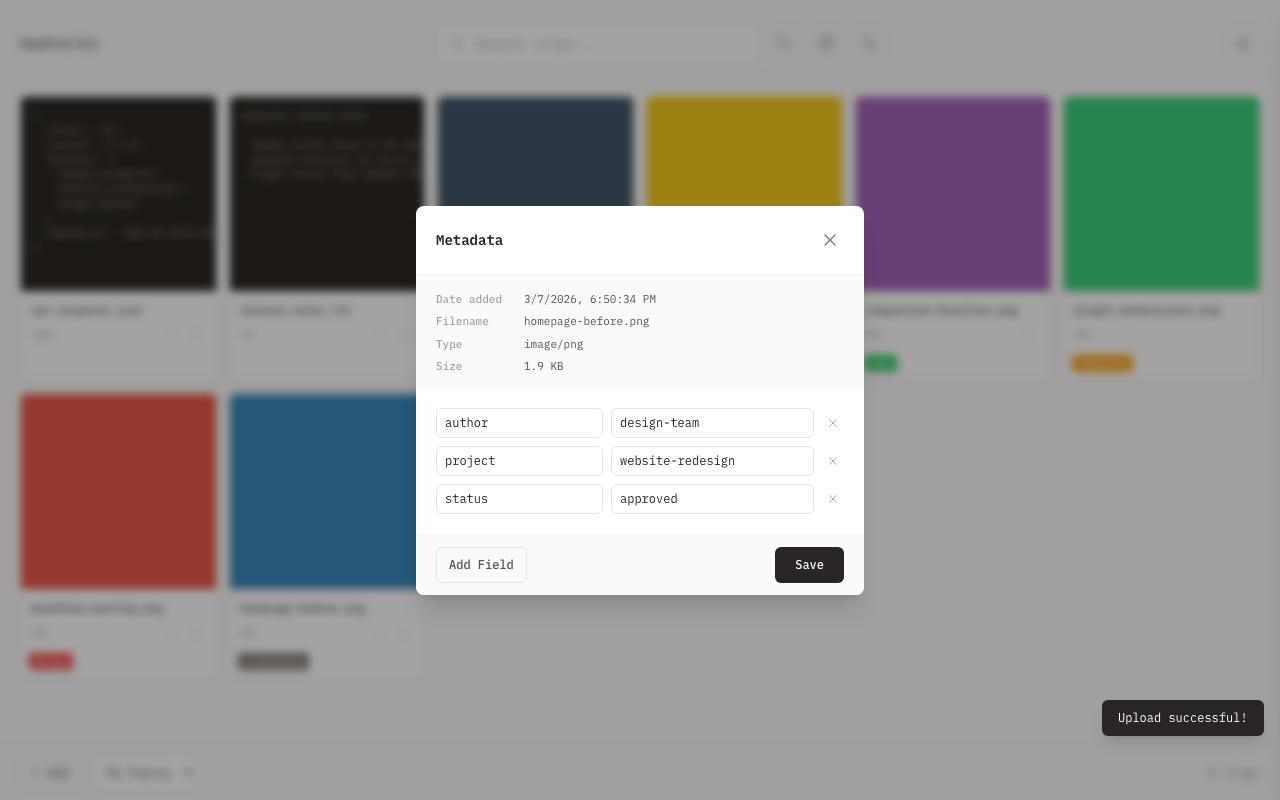
Adding Metadata
- Right-click a clip card (or click the three-dot menu)
- Select Metadata
- Click Add Field to create a new row
- Type a key and value in the row
- Click Save to persist all changes
Editing and Deleting
The metadata modal shows all existing pairs for the clip as editable input fields. Edit a key or value inline, then click Save. Each row has a delete button to remove that pair. All changes are saved atomically when you click Save.
Limits
| Constraint | Limit |
|---|---|
| Key length | 256 characters |
| Value length | 4096 characters |
| Pairs per clip | 50 |
| Key content | Cannot be empty |
Writes use an atomic read-modify-write inside a database transaction, so concurrent updates do not corrupt data.
Metadata is not searchable or filterable in the gallery. It is informational -- you use the metadata modal, REST API, or plugin API to read and write it.
REST API
| Method | Endpoint | Min Role | Description |
|---|---|---|---|
| GET | /api/v1/clips/{id}/metadata | viewer | Returns all key-value pairs for a clip |
| PUT | /api/v1/clips/{id}/metadata/{key} | editor | Sets a single key-value pair |
| DELETE | /api/v1/clips/{id}/metadata/{key} | editor | Removes a single key |
| PUT | /api/v1/clips/{id}/metadata | editor | Atomically replaces all metadata |
For full request/response details, see the REST API reference.
Plugin API
Plugins access metadata through the metadata module:
-- Get all metadata for a clip
local meta = metadata.get(clip_id)

-- Set a single key-value pair
metadata.set(clip_id, "source", "screenshot")

-- Delete a key
metadata.delete(clip_id, "source")

-- Replace all metadata atomically
metadata.set_bulk(clip_id, {
    source = "screenshot",
    project = "docs",
})
| Function | Arguments | Returns | Description |
|---|---|---|---|
metadata.get | clip_id | table or nil, error | Returns a table of all key-value pairs |
metadata.set | clip_id, key, value | true or false, error | Sets a single key-value pair |
metadata.delete | clip_id, key | true or false, error | Removes a key |
metadata.set_bulk | clip_id, table | true or false, error | Atomically replaces all metadata with the given table |
The same limits (key 256 chars, value 4096 chars, 50 pairs) apply to plugin calls.
Backup
Metadata is included in backup ZIP files and restored along with clips. The JSON column travels with the clip row, so no separate export step is needed.
Related
- Clipboard Management -- context menu overview
- Plugin API Reference -- metadata module reference