Resource Reduction
A Resource Reduction is a named, durable workspace for collapsing repeated Resources in batches. You select what to look at, a background job groups the repeats into Clusters, you review each Cluster's proposal, and only then is anything deleted.
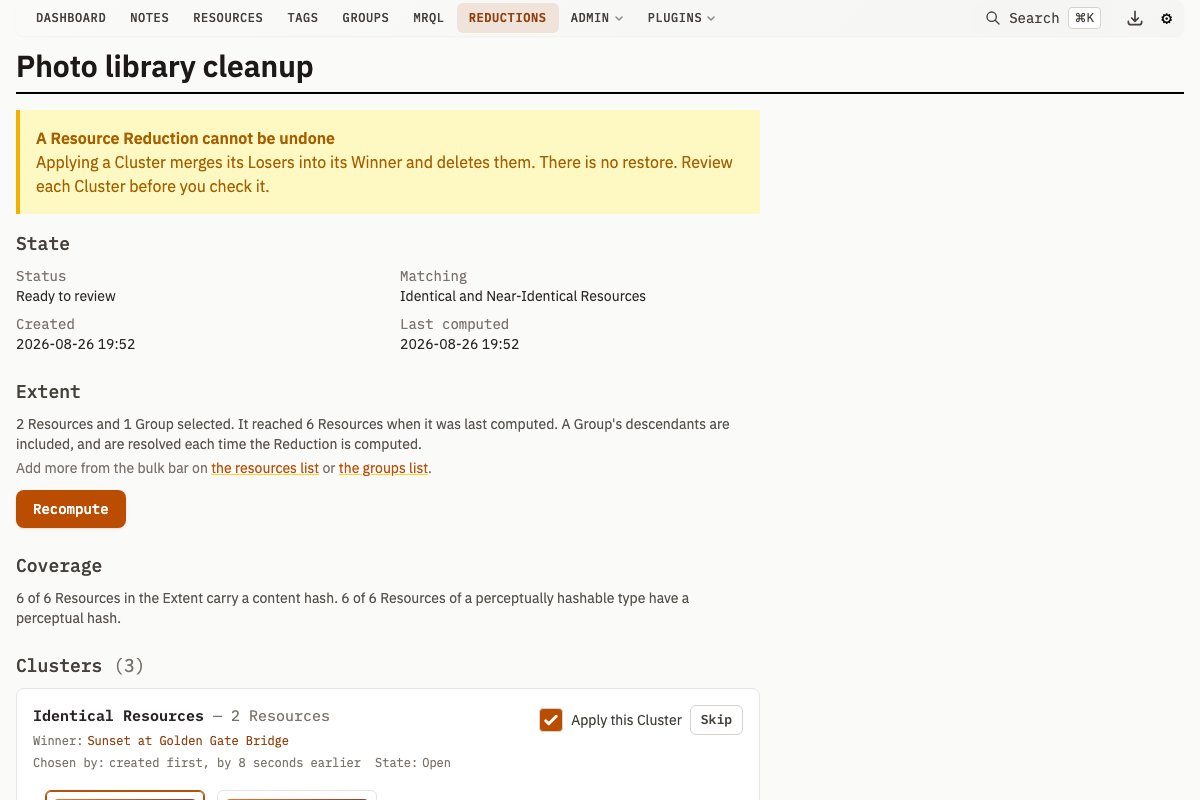
Applying a Cluster merges its Losers into its Winner and deletes them. A Resource Reduction cannot be undone, and there is no restore path. Review each Cluster before you check it.
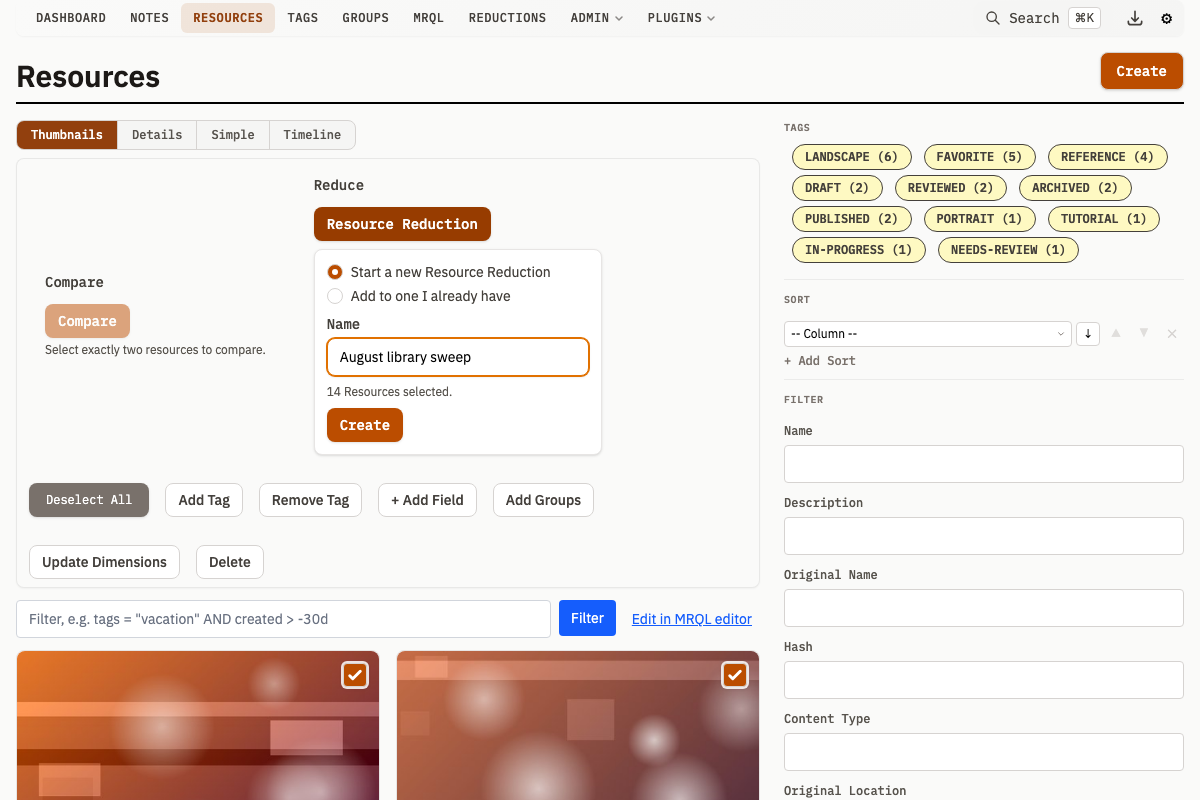
Creating a Reduction
- Select Resources on
/resources, or Groups on/groups - In the bulk editor, click Resource Reduction under Reduce
- Choose Start a new Resource Reduction and give it a name, or Add to one I already have and pick it from the list
- Click Create (or Add)
Reductions are listed at /reductions with their creation date, matching mode and status. They never expire, so a Reduction stays until you delete it.
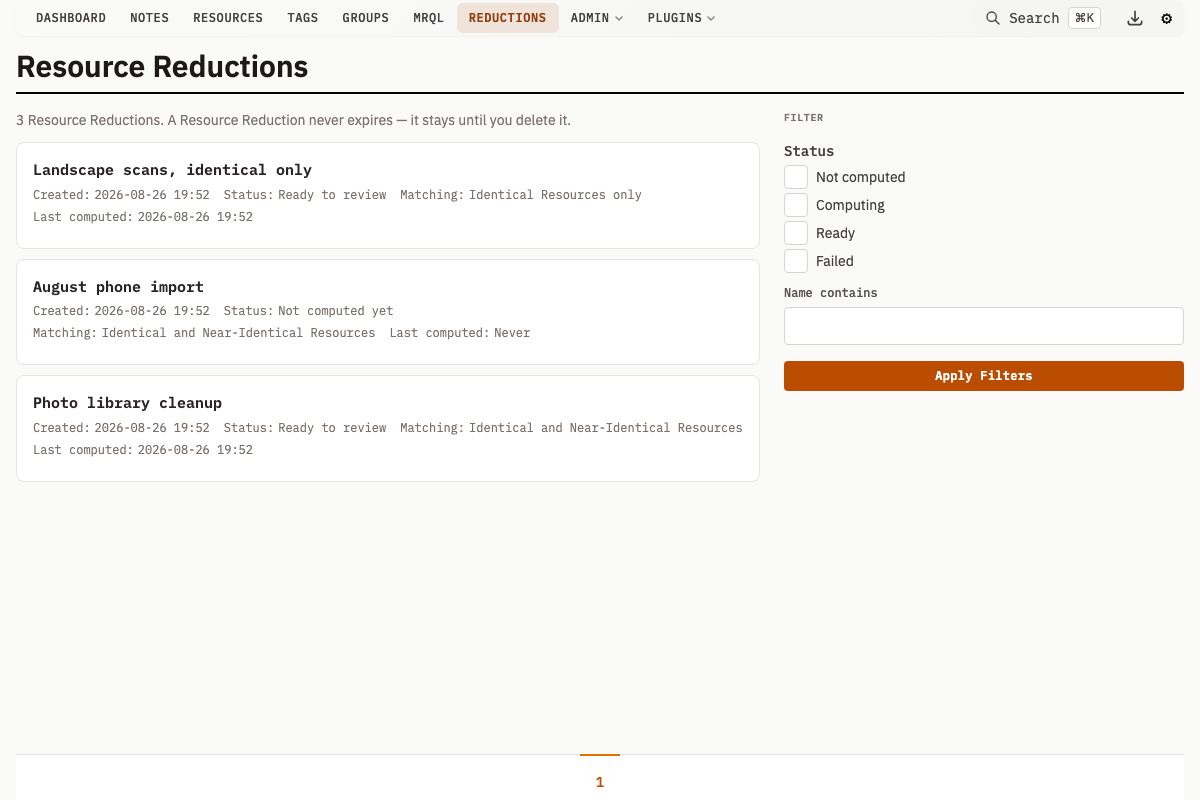
| Status | Meaning |
|---|---|
| Not computed | Created, but the Clusters have never been computed |
| Computing | A clustering job is in flight |
| Ready | The Clusters are computed and waiting for review |
| Failed | The last compute failed, or its deadline passed while it was still running |
The Extent
The set of Resources a Reduction considers is its Extent: the Resources you named, plus every Resource owned by or related to the Groups you named and all of their descendants.
Group IDs are stored rather than their expansion, so a Group's contents are resolved fresh every time the Reduction is computed. Files added to a Group afterwards enter the Extent on the next Recompute.
How It Works
Click Compute Clusters to run the clustering job. It groups the Extent into Clusters, each proposing one Winner to keep and one or more Losers to delete. Recompute runs it again over the current Extent.
The Two Tiers
| Tier | What it means | Applies to | Arrives |
|---|---|---|---|
| Identical Resources | The same content hash, and therefore the same bytes | Every content type | Checked |
| Near-Identical Resources | Within the perceptual distance threshold | JPEG, PNG, GIF and WebP only | Unchecked |
Identical Clusters arrive checked because byte-identity is certain. Near-Identical Clusters arrive unchecked because perceptual matching is a judgement that can be wrong, so the friction sits where the risk is.
The matching mode chooses which tiers a Reduction looks for:
| Mode | Effect |
|---|---|
both (default) | Both tiers |
identical | The Identical tier only. This is an index-supported grouping over the content hash, it covers video, PDF and audio, and it is the mode that stays tractable on a very large library |
The two tiers are disjoint. Byte-identical images also produce a distance-zero perceptual pair, so every Resource an Identical Cluster claims leaves the pool before the perceptual tier runs.
A Resource with no content hash is never clustered. It is reported in the coverage line instead, because grouping on the empty hash would collapse every unhashed Resource into a single Cluster.
How Near-Identical Clusters Are Formed
Candidates are sorted best-first by the Winner Rule and walked. The first unclaimed Resource becomes a Winner and claims every unclaimed Resource within threshold of itself.
Perceptual similarity is not transitive, so this is deliberately not a connected-components walk over the pair table. Every proposed deletion rests on a stored pair between that exact Loser and that exact Winner, and no transitive step ever deletes anything.
The cost of that guarantee is fragmentation: a genuine run of near-identicals splits across two Clusters when no single member is within threshold of all the others.
See Image Similarity Detection for how perceptual hashes and the distance threshold work.
Coverage
The page reports how much of the Extent it could actually examine, so "no repeats found" stays distinguishable from "nothing was hashed":
- How many Resources carry a content hash
- How many Resources of a perceptually hashable type carry a perceptual hash
When eligible Resources are unhashed, the page says so and links to Recompute similarity on /admin/overview.
Coverage measures the whole Extent, so it is shown only to an account that can see the whole Extent. A group-limited reviewer is told that instead of being given figures that describe more than they can reach.
The Winner Rule
Each Cluster has exactly one Winner: the Resource that survives and absorbs every Loser's tags, notes and group memberships. The Winner Rule is an ordered list of criteria, each breaking the ties the one before it left.
| Criterion | Chooses |
|---|---|
pixels_desc / pixels_asc | Highest / lowest resolution |
size_desc / size_asc | Largest / smallest file |
created_asc / created_desc | Created first / last |
updated_asc / updated_desc | Row edited least / most recently |
name_asc / name_desc | Name first / last alphabetically |
content_type_asc / content_type_desc | Content type first / last alphabetically |
has_description | The copy that carries a description |
associations_desc / associations_asc | Most / fewest tags, notes and groups |
The default is highest resolution, then largest file, then created first (pixels_desc, size_desc, created_asc). Change it under Settings on the Reduction's page.
A criterion that cannot tell a Cluster's members apart falls through to the next, so a rule mentioning resolution still behaves sensibly for content types that have none. If every criterion ties, the Winner falls to the lowest ID and the Cluster says so rather than presenting a tiebreaker of last resort as a decision.
Each Cluster shows which criterion decided it and by how much, because "highest resolution, by 4x the pixels" reads differently from "by a hair's breadth in the pixels".
There is no filesystem modification time anywhere in this system. updated_at is when the row was last edited.
Reviewing Clusters
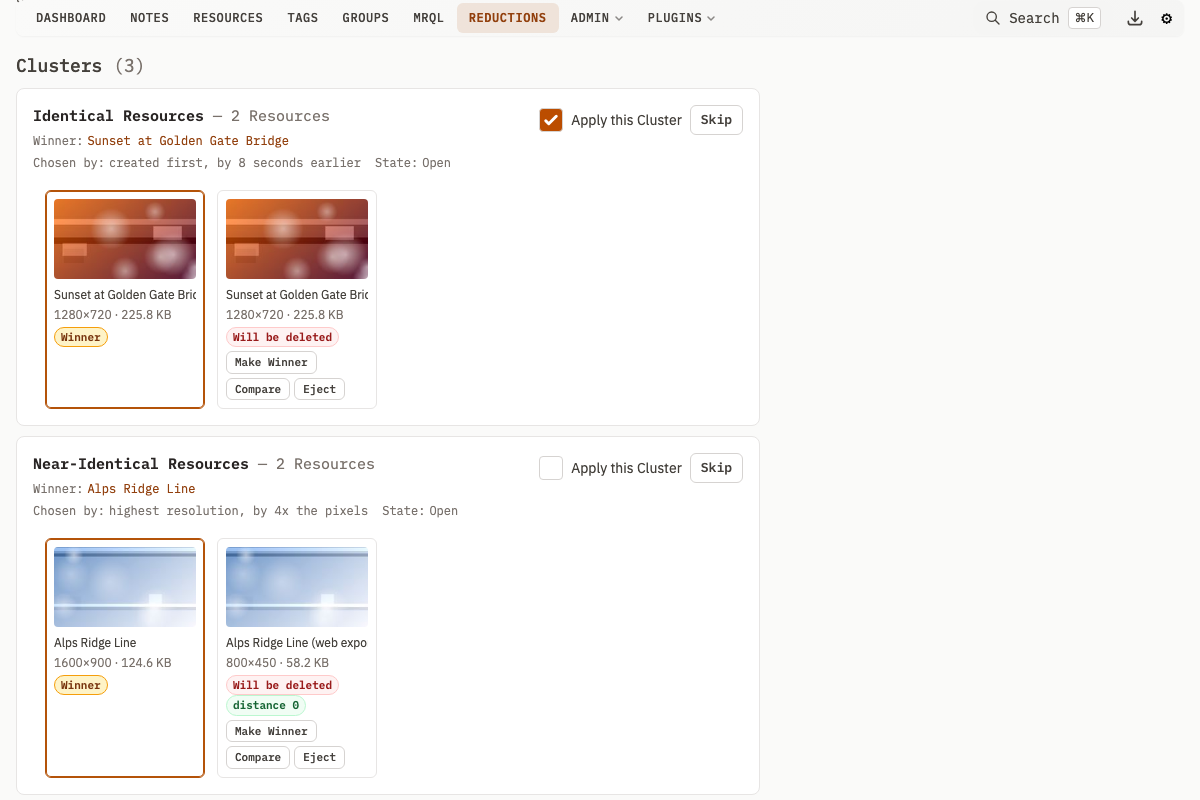
| Action | Effect |
|---|---|
| Make Winner | Promotes a member. Your judgement beats the rule |
| Eject | Removes one member from the Cluster. The Resource is left completely untouched |
| Put back | Restores an ejected member. Refused on the Near-Identical tier when that Resource has no stored match to the current Winner |
| Compare | Opens the two-up comparison of that Loser against the Winner that would absorb it |
| Skip | Moves past a Cluster without deciding about it. Reopen brings it back |
| Apply this Cluster | Checks or unchecks it for the next apply |
Promoting on the Near-Identical tier re-checks every Loser against the new Winner and ejects any that have no stored pair to it, showing them as ejected. Promotion can never quietly widen what gets deleted.
Two actions are refused:
- Demoting a Winner that sits outside the Extent. Such a Resource may win, so you can keep the better copy that lives elsewhere, but it may never be merged away by a Reduction that was not asked to consider it
- Ejecting the Winner, which would leave the Cluster with nothing to merge into. Promote another member first
Frozen Clusters
A Cluster you have explicitly acted on freezes. Its members are held out of re-clustering, so growing the Extent and recomputing can add Clusters but can never rearrange a judgement you already made.
A Cluster that merely arrived checked by default has not been acted on.
Oversized Clusters
An unusually large Near-Identical Cluster arrives unchecked whatever the tier default says, and its controls stay disabled until you click Expand these N Resources. Checking it carries an explicit acknowledgement that the server requires, so the guard is not only in the browser.
A large Identical Cluster is not treated as suspicious: fifty copies of one file are fifty copies of one file.
Persistence
Clusters paginate; members within a Cluster do not. Every decision lives in the Reduction's row, so it survives paging, a reload, closing the tab and a server restart.
Applying
Click Apply the checked Clusters to merge every checked Cluster and delete its Losers.
Applying is permanent. Verify that each checked Cluster's Winner is the copy you intend to keep.
Applying is partial and repeatable. Unchecked Clusters stay open for tomorrow, and applied ones are marked applied. A Winner that survived an applied Cluster goes back into the pool as an ordinary candidate, so a duplicate arriving next month can still be caught.
Stale Clusters
Immediately before each merge, the Cluster is revalidated. It is refused, marked stale, named in the result and kept in the Reduction when:
- A member no longer exists, or is no longer one you may see
- A member's content hash no longer matches what the plan recorded. A version upload changes the bytes without touching the similarity pairs, which is why the plan snapshots each member's hash
- On the Near-Identical tier, the stored pair between the Winner and a Loser no longer holds
One stale Cluster never refuses the whole batch. Ejected members are exempt from all of these checks, because an ejected Resource is not part of the Cluster and is left untouched.
The checks that matter run inside the transaction that performs the deletion, behind a row lock, not merely before it. An apply also acts on the proposal it was asked about: you may eject a member while a batch is running and it will be spared, but a Cluster that has been recomputed or whose Winner has been promoted since you pressed Apply is refused rather than merged, because it is no longer the proposal you approved.
Keep as Version
keepAsVersion is two flags, one per tier:
| Tier | Default | Effect |
|---|---|---|
| Near-Identical | On | Each Loser's file becomes a further version of the Winner, so there is a way back to pixels you decided against |
| Identical | Off | A byte-identical Loser has nothing to preserve |
Turning them off does not by itself reclaim disk space. Every Loser version transfers to the Winner and an upload always creates one, so the Loser's file stays referenced either way. See Resource Versioning.
Visibility
A Reduction is visible to the person who created it and to administrators. A Reduction whose owner has been deleted belongs to nobody, because a pending destructive decision is not a shared artifact.
Membership is re-checked against your current access both when the page renders and again when you apply, because a scope-limited account's subtree can change after a Reduction is created.
A Cluster reaching a Resource you may not see is not shown, not counted, not named in an apply result, and answers every action exactly as a Cluster that does not exist, including on the .json form of the page. Its identifier is derived from its members' IDs, so anything that confirmed such a Cluster existed would give those IDs away.
Limitations
Stale Perceptual Pairs
Perceptual pairs are precomputed and are not removed when a Resource's file changes. A version upload deletes that Resource's perceptual hash and re-queues the work, but the pairs it took part in survive, describing content it no longer holds.
A Reduction refuses to cluster on a pair whose endpoint has no current perceptual hash, which covers the window before the hash worker catches up. Once it has re-hashed, the old pairs are still there.
The plan snapshot means an apply never deletes bytes that changed since you reviewed them, and looking at the images is what catches a match that was never true.
Not Supported
- Undo or restore. There is no restore path in this system, and this feature does not build one
- A CLI surface. A Reduction's value is the person looking at Clusters before deletion.
mr resources mergealready serves scripted merging by someone who knows their Winner - Perceptual matching for video, PDF or audio. Those content types are reachable through the Identical tier only
- Automatic recompute. Re-scanning is always something you ask for
API Endpoints
| Method | Path | Description |
|---|---|---|
GET | /v1/reductions | List the Reductions the caller may see (name, status, sortBy, page) |
POST | /v1/reduction | Create a Reduction, or add a selection to an existing one (id, name, resourceIds, groupIds) |
POST | /v1/reduction/edit | Rename, or change the matching mode, Winner Rule or keep-as-version flags |
POST | /v1/reduction/delete | Delete a Reduction. The Resources it named are untouched |
POST | /v1/reduction/compute | Start the background clustering job. Refused with 409 while a run is in flight |
POST | /v1/reduction/cluster | Record one review decision (clusterId, action, resourceId) |
POST | /v1/reduction/apply | Merge and delete every checked Cluster's Losers |
Every write carries a version field: the optimistic-concurrency counter the caller last saw. A request carrying a stale one is refused with 409 Conflict rather than merged, because merging two judgements about which files to delete cannot be done safely. Read the current value from the Reduction before each write.
POST /v1/reduction/cluster accepts these action values: promote, eject, restore, skip, reopen, check and uncheck. Checking an unusually large Near-Identical Cluster additionally requires acknowledgeOversized.
Related Pages
- Image Similarity Detection -- perceptual hashing, distance thresholds, and the pair table the Near-Identical tier reads
- Resource Versioning -- how keep-as-version stores a Loser's file on the Winner
- Bulk Operations -- the bulk bar a Reduction is started from
- Authentication & RBAC -- group scoping, and what a confined reviewer can see