Meta Schemas
Categories, Resource Categories, and Note Types can define a JSON Schema in their metaSchema field. The schema validates the meta field of entities in that category and drives structured form generation in the UI.
How It Works
- An administrator creates a Category, Resource Category, or Note Type with a
metaSchemafield containing a JSON Schema document - When creating or editing a Group (or Resource) in that Category, the UI renders form fields matching the schema instead of free-form key-value inputs
- The schema validates metadata on save
Which Entity Types Support It
| Entity Type | MetaSchema Field | Validates |
|---|---|---|
| Category | metaSchema | Group meta fields |
| Resource Category | metaSchema | Resource meta fields |
| Note Type | metaSchema | Note meta fields |
All three entity types support MetaSchema. When set, the UI renders structured form fields and a schema-aware metadata panel on the entity detail page.
Schema Format
The metaSchema field stores a standard JSON Schema document as a string:
{
  "type": "object",
  "properties": {
    "email": {
      "type": "string",
      "format": "email",
      "description": "Primary email address"
    },
    "phone": {
      "type": "string",
      "pattern": "^\\+?[0-9-]+$"
    },
    "birthday": {
      "type": "string",
      "format": "date"
    }
  },
  "required": ["email"]
}
Common Schema Patterns
Contact Information (Person Category)
{
  "type": "object",
  "properties": {
    "email": {"type": "string", "format": "email"},
    "phone": {"type": "string"},
    "birthday": {"type": "string", "format": "date"},
    "social": {
      "type": "object",
      "properties": {
        "twitter": {"type": "string"},
        "linkedin": {"type": "string"}
      }
    }
  },
  "required": ["email"]
}
Project Tracking (Project Category)
{
  "type": "object",
  "properties": {
    "status": {
      "type": "string",
      "enum": ["planning", "active", "on-hold", "completed"]
    },
    "deadline": {"type": "string", "format": "date"},
    "budget": {"type": "number"},
    "lead": {"type": "string"}
  }
}
Receipt Classification (Receipt Resource Category)
{
  "type": "object",
  "properties": {
    "vendor": {"type": "string"},
    "amount": {"type": "number"},
    "currency": {
      "type": "string",
      "enum": ["USD", "EUR", "GBP"]
    },
    "date": {"type": "string", "format": "date"},
    "category": {
      "type": "string",
      "enum": ["office", "travel", "software", "other"]
    }
  },
  "required": ["vendor", "amount"]
}
Setting a Schema
Via the UI
- Navigate to Categories, Resource Categories, or Note Types
- Create or edit a Category
- Enter the JSON Schema in the Meta Schema field, or click Visual Editor to build the schema interactively
- Save
Via the API
curl -X POST http://localhost:8181/v1/category \
  -H "Content-Type: application/json" \
  -H "Accept: application/json" \
  -d '{
    "Name": "Person",
    "Description": "Individual contacts",
    "MetaSchema": "{\"type\":\"object\",\"properties\":{\"email\":{\"type\":\"string\",\"format\":\"email\"}},\"required\":[\"email\"]}"
  }'
Form Generation
When a Category has a schema defined, the Group, Resource, or Note create/edit form replaces free-form metadata inputs with structured fields:
stringproperties render as text inputsstringwithformat: "email"renders as an email inputstringwithformat: "date"renders as a date pickerstringwithenumrenders as a dropdown selectnumberproperties render as numeric inputsintegerproperties render as numeric inputs (whole numbers)booleanproperties render as checkboxesarrayproperties render as repeatable field groupsobjectproperties render as nested fieldsetsrequiredfields are marked as mandatory
The form component also supports $ref for reusable schema definitions, oneOf/anyOf/allOf for schema composition, if/then/else for conditional fields, and additionalProperties for free-form key-value editing within an object.
Visual Schema Editor
Instead of writing JSON Schema by hand, you can use the visual editor to build schemas interactively.
Opening the Editor
- Navigate to Categories, Resource Categories, or Note Types
- Create or edit a Category
- Click the Visual Editor button next to the Meta Schema field
- The editor opens in a modal with three tabs
Editor Tabs
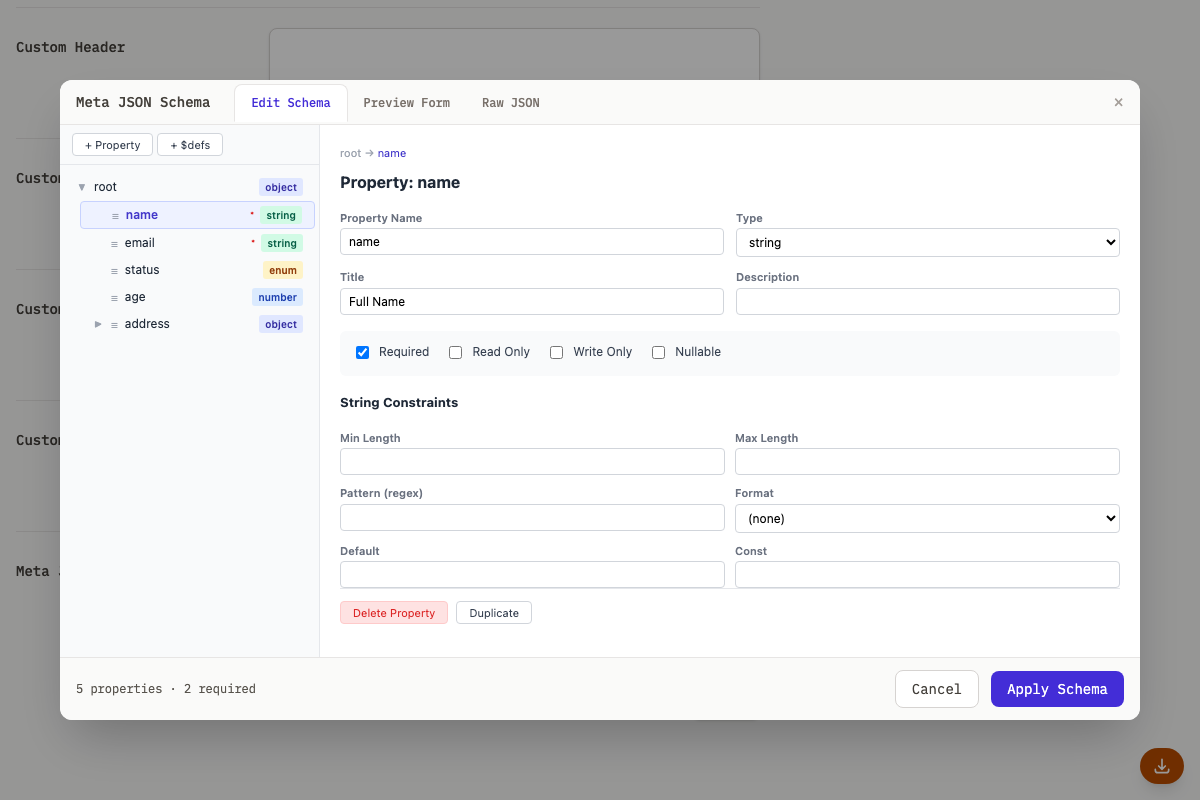
Edit Schema: The visual builder with a tree view on the left and a property editor on the right. Click nodes in the tree to edit their type, constraints, and metadata. Use the "+ Property" button to add new fields.
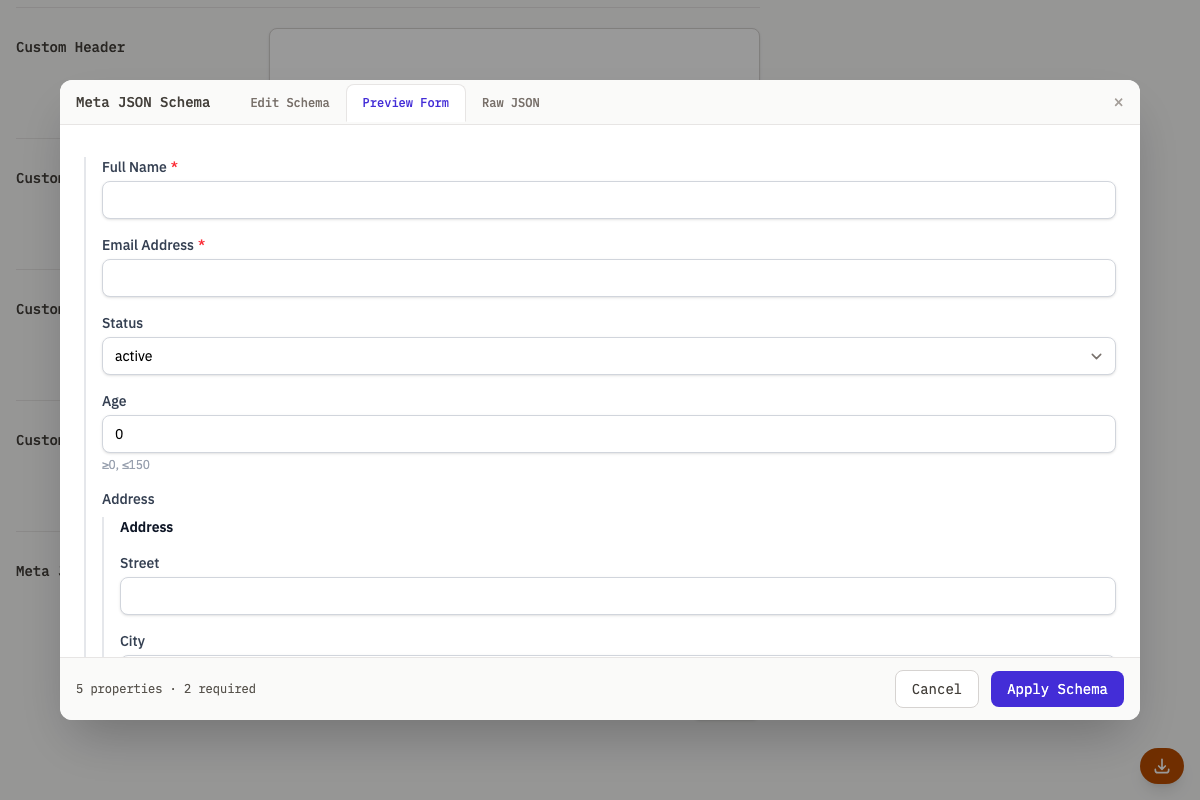
Preview Form: Shows a live preview of the form that will be generated from your schema. This is exactly what users will see when creating or editing entities in this category.
Raw JSON: The full JSON Schema as editable text. Changes here sync with the visual editor. Use this for advanced schemas that the visual editor does not fully support.
Building a Schema
- Click + Property in the tree toolbar
- Select the new property in the tree
- Set its name, type, and constraints in the detail panel
- Check Required if the field is mandatory
- For enum fields: choose "string" type, then add enum values in the Enum Values section
- For nested objects: choose "object" type, then add child properties
- Click Preview Form to verify the form looks right
- Click Apply Schema to save
Composition Keywords
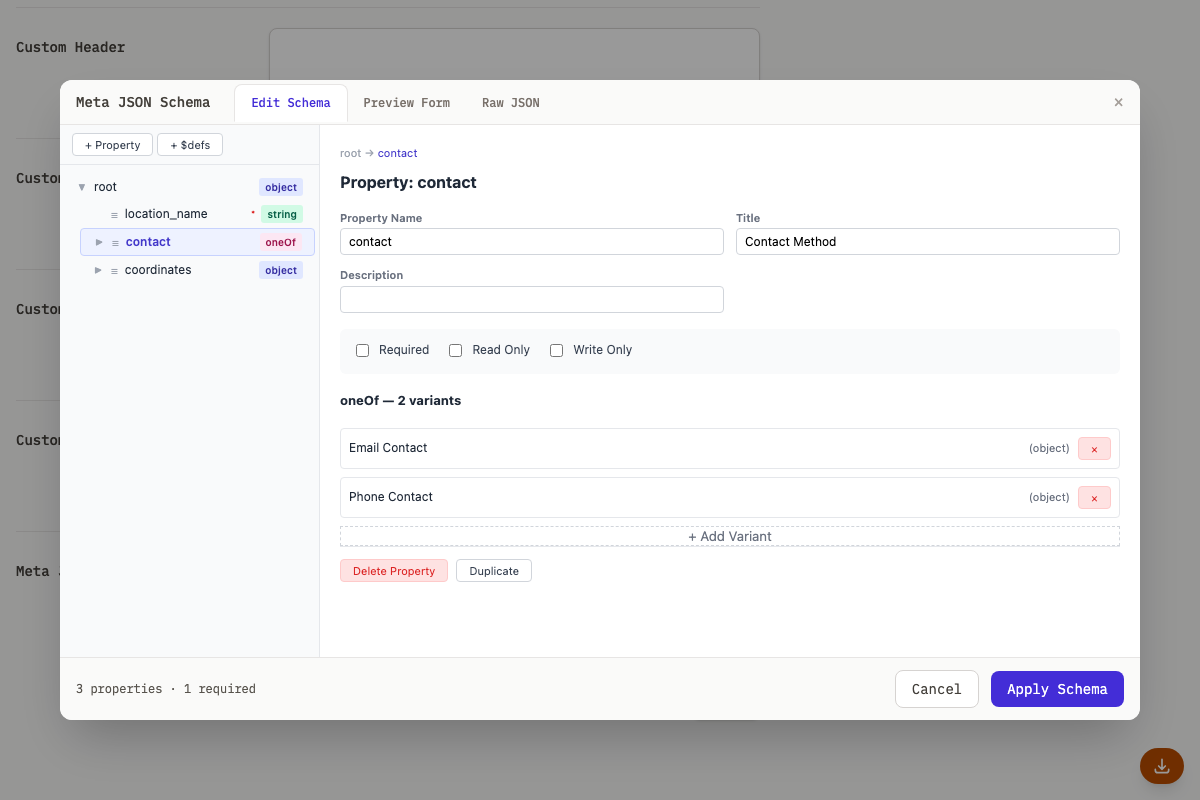
The editor supports oneOf, anyOf, allOf, and $ref for advanced schema patterns:
- Use
$defsto define reusable schema fragments - Use
$refto reference definitions - Use
oneOf/anyOffor variant types (e.g., a "contact" field that can be email or phone)
Detail View Display
When a Category has a schema defined and a Group (or Resource) has metadata, the detail page renders a structured metadata panel just below the description. This replaces the need to scroll to the sidebar JSON table.
Smart Hybrid Layout
Fields are displayed in a responsive grid layout:
- Short values (strings, numbers, booleans, enums) appear in a multi-column grid
- Long values (text exceeding ~80 characters, arrays, and nested objects) appear in full-width rows below the grid
- Empty/null fields are hidden by default, with a "Show N hidden fields" toggle at the bottom
Type-Aware Rendering
Each field renders according to its schema type:
| Schema Type | Display |
|---|---|
string | Plain text |
string with format: "email" | Clickable mailto: link |
string with format: "uri" | Clickable link |
string with format: "date" | Formatted date |
string with enum | Colored pill/badge |
string with labeled enum (oneOf + const + title) | Pill showing the human-readable title |
integer / number | Monospace text |
boolean | "Yes" / "No" |
array of scalars | Inline pills |
Nested object | Flattened with a labeled path (e.g., "Address › City") |
Nested objects are flattened up to four levels deep; properties below that do not appear in the structured panel and remain visible only in the sidebar JSON table.
Labels and Tooltips
- If a property has a
titlefield, it is used as the display label (falling back to the raw key name) - If a property has a
descriptionfield, it appears as a tooltip on hover over the label - Clicking a label copies the dot-notation meta path (e.g.,
address.city) - Clicking a value copies the value to the clipboard
Built-in Shape Detection
Object values are automatically detected and rendered as smart widgets when they match well-known shapes:
| Shape | Detection Keys | Display |
|---|---|---|
| URL / Location | href + host or hostname | Clickable link with host subtitle |
| GeoLocation | latitude + longitude (or lat + lng) | Coordinates with OpenStreetMap link |
| Date Range | start + end (both valid dates) | Formatted range "Mar 15, 2024 -- Apr 1, 2024" |
| Dimensions | width + height (both numbers) | "1920 × 1080" |
Shape detection runs automatically. To override it, use the x-display annotation (see below).
The x-display Schema Annotation
Add x-display to any schema property to control how it renders in the detail view:
{
  "type": "object",
  "properties": {
    "location": {
      "type": "object",
      "x-display": "geo",
      "properties": { "lat": { "type": "number" }, "lng": { "type": "number" } }
    },
    "raw_data": {
      "type": "object",
      "x-display": "raw",
      "properties": { "href": { "type": "string" }, "host": { "type": "string" } }
    }
  }
}
Built-in values:
| Value | Effect |
|---|---|
"url" | Force URL renderer |
"geo" | Force GeoLocation renderer |
"daterange" | Force Date Range renderer |
"dimensions" | Force Dimensions renderer |
"raw" or "none" | Opt out of shape detection; show as key-value grid |
Plugin values: x-display values starting with plugin: route to a plugin's custom renderer. See Plugin Lua API for details.
{
  "images": {
    "type": "object",
    "x-display": "plugin:my-plugin:image-grid"
  }
}
When x-display is set on an object property, the object is NOT flattened into individual fields. Instead, the entire object is passed to the renderer as a whole.
The x-color Schema Annotation
A labeled-enum entry (oneOf plus const plus title) may carry x-color, a CSS color, to set the color of its pill in the structured metadata panel. The visual editor writes and round-trips it through a color picker, so hand-written values should be hex.
{
  "status": {
    "oneOf": [
      { "const": "active", "title": "Active", "x-color": "#16a34a" },
      { "const": "archived", "title": "Archived", "x-color": "#78716c" }
    ]
  }
}
Sidebar JSON Table
The raw JSON table in the sidebar remains available for power users and for fields not covered by the schema. The structured metadata panel does not replace it.
Search Integration
When a Category has a schema defined, the list page search form automatically renders typed filter fields based on the schema properties.
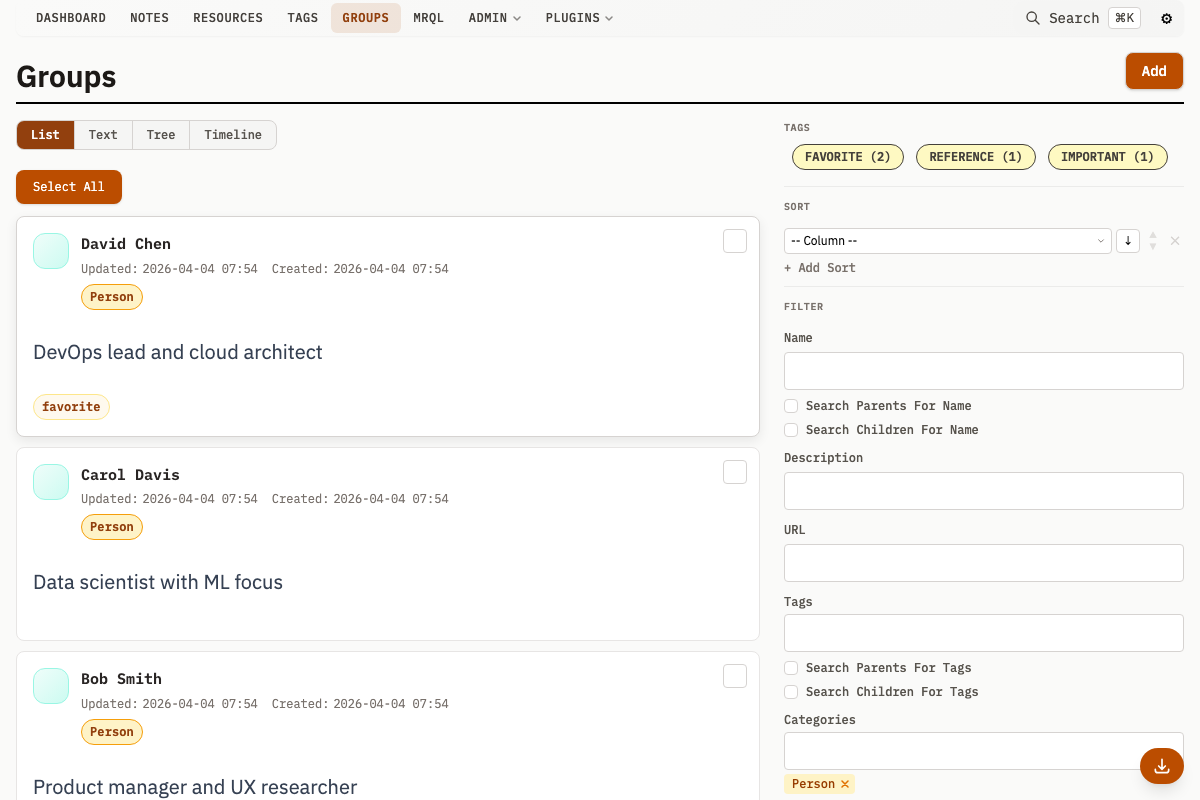
- String fields render as text inputs with a LIKE operator by default
- Number fields render as numeric inputs with comparison operators (
=,≠,>,≥,<,≤) - Enum fields render as checkboxes (≤6 values) or multi-select dropdowns (>6 values)
- Boolean fields render as three-state radio buttons (Any / Yes / No)
When multiple categories are selected, only fields common to all selected categories are shown. Fields that exist in some but not all categories are hidden.
Schema-driven filter fields appear alongside the existing free-form metadata filters. The free-form filters are automatically adjusted to exclude fields already covered by the schema filters.
Known Limitations
Mixed-type enums with identical string representations: Enum schemas that contain values of different JSON types which stringify the same way (e.g., enum: [1, "1"] or enum: [null, "null"]) cannot be distinguished in the search UI. HTML form controls carry string values only, so selecting "1" from such an enum will always submit the non-string variant (numeric 1). Avoid mixing types that collide when converted to strings; use a single consistent type per enum instead.
Variant scoring does not penalize extra properties: When the form renders oneOf/anyOf variants, it picks the best-matching branch by scoring discriminator fields (const, enum) and key overlap. Extra properties beyond what a variant declares do not reduce its score, even if the variant has additionalProperties: false. This is intentional: the scoring function selects the correct variant, not validates data. Extra keys are handled separately by stripStaleKeys on schema switch and by server-side validation.
Conditional branch data cleanup with additionalProperties: true: When a schema uses if/then/else and the user switches between branches, data from the inactive branch is automatically removed for fields declared exclusively in that branch. For nested objects under shared keys, stale nested keys are only cleaned up when the nested schema sets additionalProperties: false. If both branches share an object property whose schema allows additional properties (the default), keys introduced by one branch will persist after switching to the other. To ensure clean branch transitions for nested objects, set additionalProperties: false on nested object schemas that differ between branches.
Free-Form Metadata
Groups without a Category (or with a Category that has no schema) display a free-form metadata editor. This editor renders dynamic key-value fields where you can add, remove, and edit metadata entries. Each field has a key name and a value. The editor handles type coercion for numeric, boolean, null, and date values automatically.
Unless a schema explicitly sets additionalProperties: false, the form includes a free-form key-value section below the structured fields. This lets users add metadata beyond what the schema specifies. Setting additionalProperties: false removes that section, restricting metadata to the declared properties.
The free-form editor can also load field suggestions from a remote URL, providing autocomplete for key names based on existing metadata patterns in the database.
Note Type Detail Page
A Note Type's own detail page (the page for the type itself, not for a note) surfaces both the notes that use the type and the type's configuration.
Notes Using the Type
The page lists a bounded page of notes whose Note Type is this one, alongside a true total count, with a link to the full filtered note list. This makes it easy to see what a type is actually applied to. A Resource Category's detail page uses the same true-total pattern for its resources. A Category's detail page also lists a bounded page of its groups with a link to the full list, but its group figure is the length of that capped preload rather than a true total count.
Configuration Summary
A summary strip reports the type's own configuration at a glance:
- Schema -- whether a
metaSchemaisDefinedorNone. - Sections -- whether section visibility is
Custom(asectionConfigis set) orDefault. - Custom templates -- which template slots are populated, listed by name: Header, Sidebar, Summary, Avatar, MRQL, and CSS (
CustomCSS). See Custom Templates for what each slot does.
The strip only lists the Custom templates entry when at least one slot is set.
Indexed metadata keys
Each resource-category, group-category, and note-type editor has an Indexed
metadata keys section beside its metadata schema. Click Add indexed key,
enter score or a nested path such as camera.iso, choose Numeric or Text
equality, and save the category/type. Use the key without the meta. prefix.
Keys can be indexed even when no JSON Schema is defined.
For type = resource AND meta.score = 10 ORDER BY RANDOM() LIMIT 50, add
score / Numeric in the relevant resource-category editor. MRQL syntax stays
the same, and the database planner can use the index once its build finishes.
Queries on keys without a completed index keep their original numeric execution
path.
- Numeric supports numeric equality and range filters. It uses MRQL's safe numeric conversion on PostgreSQL and native JSON extraction on SQLite, preserving each engine's existing handling of mixed metadata types. PostgreSQL uses a bounded numeric index plus a small companion index for long values; MRQL checks those long values with its original numeric comparison. This keeps long metadata writable without changing numeric equality or range results.
- Text equality supports case-insensitive equality such as
meta.camera.model = "X100". PostgreSQL uses a hash index so long text values remain writable; SQLite uses an expression B-tree. Substring searches, regular expressions, and metadata ordering are not the purpose of these indexes.
Declarations belong to categories/types, while physical indexes cover the whole entity type. Categories requesting the same key and kind share the same physical indexes. This also accelerates queries without a category filter. Removing a declaration or deleting a category keeps the shared index until its last requester disappears. Both index kinds can coexist for a mixed-type key.
Builds run in the background after saving. Admin → Settings → Metadata index builds shows progress and failures. PostgreSQL builds and removes indexes concurrently. SQLite builds hold a write lock and may delay writes on large databases. Indexes add storage and write cost, so choose frequently queried keys. The database maintains them automatically as metadata changes, including inherited metadata updates. Ordinary missing keys and nonnumeric values remain valid.
Each category/type supports up to 32 declarations. Paths contain up to eight segments of letters, digits, or underscores, and at most 128 characters total. Duplicate declarations and invalid paths are rejected.
The category/type create and update APIs accept MetadataIndexes as a JSON-encoded
string, for example:
{
  "MetadataIndexes": "[{\"key\":\"score\",\"kind\":\"numeric\"}]"
}
Omitting the field on an update preserves it. Set it to "[]" to remove that
category's declarations. The entity type comes from the category/type being
edited. Index declarations are included in category export/import. Existing
manually created database indexes are not managed or removed by this feature.
MRQL's native Explain shows whether the optimizer chooses an index for a query. Broad filters may still favor a table scan, and exact random sampling still considers every matching row.