Plugin System
Lua-based plugins extend Mahresources with custom actions, hooks, pages, JSON API endpoints, and menu items. Plugins run in sandboxed VMs, are discovered automatically from a configurable directory, and can be enabled or disabled at runtime.
Configuration
| Flag | Env Variable | Default | Description |
|---|---|---|---|
-plugin-path | PLUGIN_PATH | ./plugins | Directory to scan for plugin subdirectories |
-plugins-disabled | PLUGINS_DISABLED=1 | false | Disable the plugin system entirely |
-plugin-schedule-tick | PLUGIN_SCHEDULE_TICK | 30s | How often the plugin scheduler looks for due work; bounds the resolution of every plugin schedule |
Plugin Discovery
At startup, the plugin manager scans the plugin directory for subdirectories containing a plugin.lua file. Discovery is sorted alphabetically for deterministic load order.
plugins/
+-- my-plugin/
|   +-- plugin.lua
+-- another-plugin/
    +-- plugin.lua
During discovery, a temporary Lua VM executes only the top-level code of plugin.lua (not init()) to read the plugin global table for metadata and settings. The temporary VM is then closed.
Plugin Metadata
Every plugin declares a global plugin table:
plugin = {
    name = "image-processor",
    version = "1.0.0",
    description = "Processes images using external APIs"
}
| Field | Required | Description |
|---|---|---|
name | Yes | Plugin identifier (displayed in management UI). Must match ^[a-z][a-z0-9_-]{0,49}$ |
version | No | Version string |
description | No | Short description |
settings | No | Array of setting definitions |
api_version | No | Declares a permission manifest. See Plugin Permissions |
capabilities | No | The mah modules to install. Requires api_version |
network | No | Outbound host allowlist. Requires api_version |
download_limits | No | Per-domain pacing for this plugin's own mah.download.submit jobs. Requires api_version |
allow_private_hosts | No | Permission to reach private addresses. Requires api_version |
dependencies | No | Plugin names that must be enabled first. Requires api_version |
min_app_version | No | Recorded and displayed, never enforced. Requires api_version |
The name is validated at discovery: lower case, starting with a letter, up to 50 characters of a-z, 0-9, - and _. It is a URL segment in every menu href and the prefix of every shortcode the plugin registers, so a name outside that grammar is skipped with a warning rather than loaded. Two directories declaring the same name are both skipped, because the name is what a plugin's enabled state, settings and KV namespace belong to.
A plugin that declares api_version receives only the capabilities it lists -- plus what those imply, and the handful of modules every plugin gets. If it also declares network, its outbound requests are confined to those hosts; declaring no network means any public host, which is the broadest policy rather than the narrowest. It may also declare download_limits to throttle only its own mah.download.submit jobs by domain; those limits grant no new capability and do not affect other users or plugins. A plugin that declares no api_version at all is legacy: it keeps the full mah surface, with a warning. Legacy is not an exemption from the network rules. See Plugin Permissions for the capability list, the consent model, and the three network layers.
Plugin Lifecycle
- Discovery -- Plugin directory is scanned at startup. Metadata and settings are read from each
plugin.lua. - State check -- The database is queried for previously enabled plugins. Those plugins are enabled automatically.
- Enable -- A full Lua VM is created with safe libraries.
plugin.luais executed, theninit()is called (if defined). Hooks, actions, injections, pages, menus, and API endpoints registered duringinit()become active. - Run -- The plugin responds to hooks, serves pages, and executes actions.
- Disable -- All hooks, injections, block types, pages, menus, actions, and API endpoints are removed. In-flight async work is waited for, bounded at 5 seconds, after which the VM is closed once that work stops. Disabling is refused while another enabled plugin depends on this one.
Plugin Settings
Settings are defined in the plugin.settings table and appear in the management UI when the plugin is selected.
plugin = {
    name = "my-plugin",
    settings = {
        { name = "api_key", type = "password", label = "API Key", required = true },
        { name = "model", type = "select", label = "Model", options = {"fast", "quality"}, default = "fast" },
        { name = "max_size", type = "number", label = "Max Size", default = 1024 },
        { name = "enabled", type = "boolean", label = "Feature Enabled", default = true },
        { name = "prefix", type = "string", label = "Output Prefix", default = "processed_" }
    }
}
Setting Types
| Type | Validation | UI Element |
|---|---|---|
string | Required check only | Text input |
password | Required check only | Password input |
boolean | Must be boolean | Checkbox |
number | Must be numeric | Number input |
select | Must match one of options | Dropdown |
Required settings must be configured before the plugin can be enabled.
Reading Settings at Runtime
local api_key = mah.get_setting("api_key")
local max_size = mah.get_setting("max_size")
Returns the setting value with the correct Lua type (string, number, boolean), or nil if not set.
State Persistence
Plugin enabled/disabled state and settings are stored in the database (PluginState table). This means:
- Plugins that were enabled before a restart are re-enabled automatically
- Settings survive server restarts
- The plugin directory itself only needs the Lua source files
Management UI
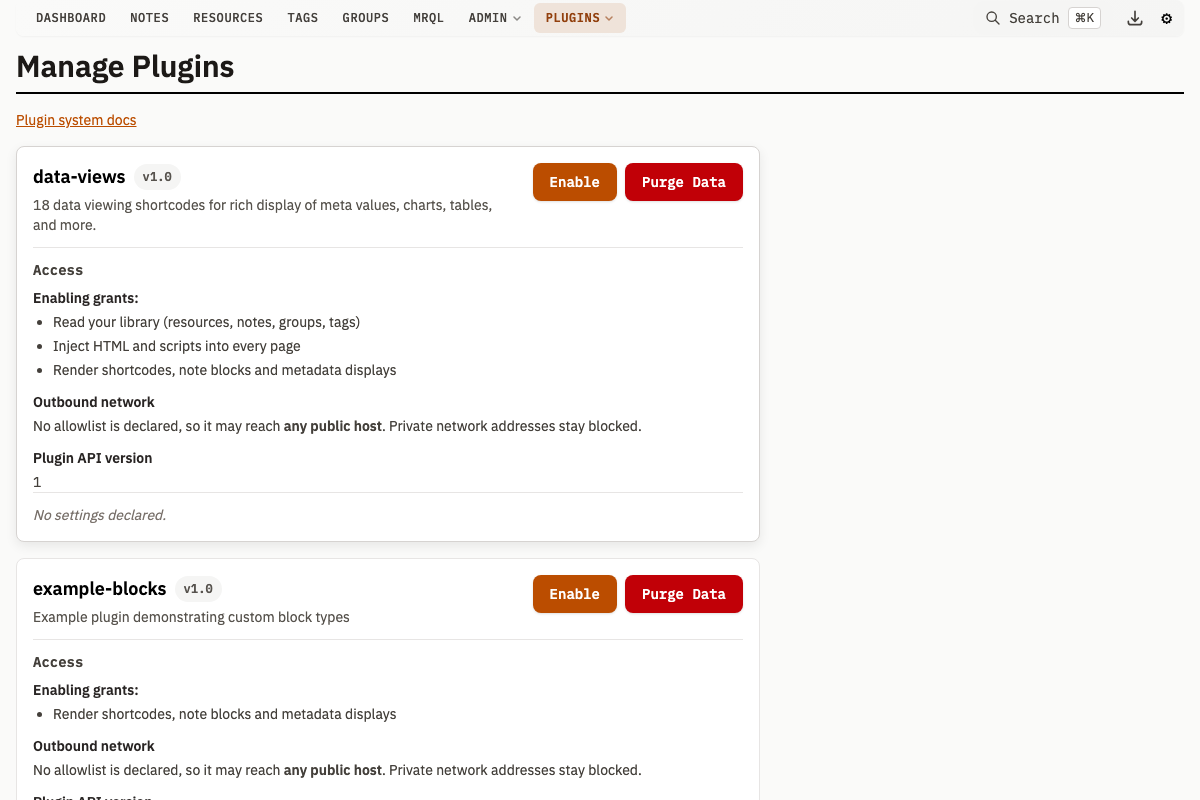
Navigate to the plugin management page to see all discovered plugins with their name, version, description, and current state (enabled/disabled). From this page:
- Enable or disable individual plugins
- Configure plugin settings
- Review the capabilities, network allowlist, and dependencies the plugin declares
- Open or close the plugin to group-limited accounts
- Inspect its schedules and run one now
- Inspect one-shot deferred downloads submitted by
mah.download.submit - Purge its stored data
- Open its generated documentation page
Management API
| Method | Path | Description |
|---|---|---|
GET | /v1/plugins/manage | List all discovered plugins with state |
POST | /v1/plugin/enable | Enable a plugin (form: name) |
POST | /v1/plugin/disable | Disable a plugin (form: name) |
POST | /v1/plugin/settings | Save settings (query: name, JSON body: key-value pairs) |
POST | /v1/plugin/purge-data | Purge all KV store data for a disabled plugin (form: name) |
POST | /v1/plugin/scopedAccess | Allow or refuse group-limited accounts per plugin (form: name, allowed). See Plugin Permissions |
GET | /v1/plugin/schedules | List recorded plugin schedules. See mah.schedule |
POST | /v1/plugin/schedule/run | Run one schedule now |
GET | /v1/plugin/scheduled-downloads | List one-shot deferred downloads for a plugin |
POST | /v1/plugin/scheduled-downloads/cancel | Cancel a pending deferred download |
Enable a Plugin
curl -X POST http://localhost:8181/v1/plugin/enable \
  -d "name=image-processor"
Required settings must be saved before enabling. If required settings are missing, the enable request fails with 400 Bad Request and a single-message JSON body, {"error": "missing required settings: [...]"} (not the structured multi-error {"errors": [...]} format used by entity validation).
Save Settings
curl -X POST "http://localhost:8181/v1/plugin/settings?name=image-processor" \
  -H "Content-Type: application/json" \
  -d '{
    "api_key": "sk-abc123",
    "model": "quality"
  }'
Only keys declared in plugin.settings are persisted; unknown keys are ignored.
Key-Value Storage
Plugins have access to a persistent key-value store via the mah.kv module. Each plugin's data is scoped by plugin name -- plugins cannot read or write another plugin's keys.
mah.kv.set("last_run", "completed")
local last = mah.kv.get("last_run")
mah.kv.delete("last_run")
local keys = mah.kv.list("prefix_")
Values are JSON-serialized before storage and deserialized on read, up to 8 MB per key. For a key that a later call into the plugin, or the same plugin in another process, may have written since it was read, mah.kv.compare_and_set writes only while the stored value is still the one that was read. See the mah.kv reference.
Purging Plugin Data
To purge all KV data for a plugin, disable the plugin first, then call the purge endpoint:
curl -X POST http://localhost:8181/v1/plugin/purge-data \
  -d "name=image-processor"
The plugin must be disabled before purging. The management UI also has a Purge Data button on the plugin detail view for disabled plugins.
Lua VM Sandboxing
Each enabled plugin runs in an isolated Lua VM with restricted libraries.
Allowed: base, table, string, math, coroutine
Blocked: os, io, debug, package
Removed base functions: dofile, loadfile, load, loadstring
Every VM that executes a plugin.lua opens the same libraries and removes the same base functions: the discovery-time one that reads metadata at startup, the enable-time one, and the one that parses settings. That is deliberate, so a plugin cannot tell which run it is in and declare a different manifest to each. Discovery still executes the top-level code of every plugin.lua on disk, enabled or not, so only place trusted files in the plugin directory.
Each VM has a mutex ensuring single-threaded access. All calls into the VM (hooks, actions, page handlers) acquire this lock.