Introduction
Mahresources is a self-hosted system for storing files, writing notes, and linking them together. It runs as a single Go binary with SQLite or PostgreSQL, and serves a web UI for browsing, searching, and editing everything.
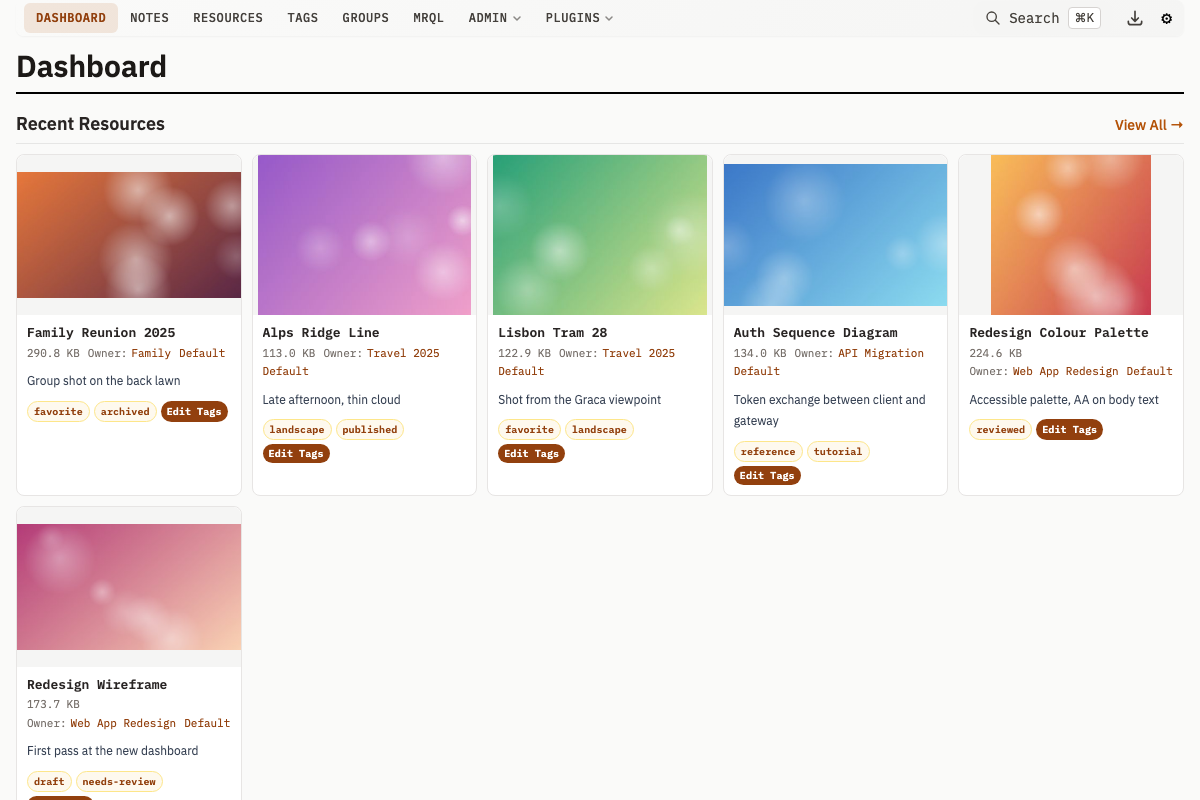
What is Mahresources?
Files (called Resources), Notes, and Groups are stored in a database with tracked relationships and full-text search. Groups nest inside each other and contain any mix of Resources and Notes. Tags and Categories provide additional ways to classify items across Groups.
Key Features
Any file type can be stored as a Resource. Images, videos, and Office documents get automatic thumbnail generation (videos require FFmpeg, documents require LibreOffice).
Notes are text entries that link to specific Resources and Groups. Within a Note, note blocks provide structured content: text, heading, divider, gallery, references, todos, table, and calendar. Plugins can register additional block types. Individual Notes can be published with note sharing. Generate a share token and serve it on a separate read-only HTTP server.
Groups form a nested hierarchy. Each Group can contain Resources, Notes, and other Groups. Group relations define typed connections between Groups (e.g., "works at", "belongs to").
Tags and categories provide additional classification across Groups. Tags apply to any entity. Categories define types for Groups (e.g., "Person", "Project"), and Resource Categories do the same for Resources.
Full-text search via FTS5 (SQLite) or tsvector (PostgreSQL) covers all content, accessible via Cmd/Ctrl+K. Saved queries let you store and re-run raw SQL. For database-level write protection, configure DB_READONLY_DSN as a read-only connection.
MRQL is a SQL-like query language for Resources, Notes, and Groups. It has its own page at /mrql, a filter bar on every list page, saved queries of its own, and an [mrql] shortcode for embedding results in Category templates. See MRQL.
Optional user accounts and role-based access control (admin, editor, user, guest) can be turned on with -auth -- off by default, with group-subtree scoping for limited users. See Authentication & RBAC.
Perceptual hashing finds visually similar images automatically across your library. Resources support versioning to track changes over time. A series groups Resources with shared metadata (e.g., pages of a scanned document).
The download queue accepts remote URLs and tracks progress via the Download Cockpit UI. An activity log records create, update, delete, and plugin operations across all entities.
Categories, Resource Categories, and Note Types support custom templates: HTML fragments with server-side shortcodes, rendered into slots on detail pages, cards, hover cards, and list pages (see Custom Templates). All three also carry a meta schema, a JSON Schema that validates metadata and generates a structured form for it.
A Lua plugin system can intercept create/update/delete operations, add custom pages, run background jobs, perform full entity CRUD (mah.db.create_*, mah.db.update_*, mah.db.delete_*), and store per-plugin data via a key-value store (mah.kv.*).
Paste upload lets you paste images or text from the clipboard (Cmd/Ctrl+V) to create Resources with a preview-and-tag modal workflow. Every page has a JSON API equivalent (Accept: application/json or .json suffix) for scripting and integration.
Out of the box there is no authentication or authorization -- run it on a private network only. Built-in Authentication & RBAC is available (opt-in via -auth) when you need accounts and roles.
Do not expose it to the internet without protection. For remote access, put it behind a reverse proxy with authentication (nginx + basic auth, OAuth2 Proxy, Authelia, etc.), and enable -auth if you want per-user accounts on top.
Who is This For?
Anyone who wants to store files and notes locally, link them together, and search across them without a cloud service. Common uses: research material management, personal knowledge bases, and file archiving with metadata.
Getting Started
Install Mahresources to get started.