Activity Log
Most create, update, and delete operations are recorded, and request-driven writes capture the HTTP request context (path, user agent, IP) that triggered them. Coverage is not universal. The generic inline quick-edit path does not log name, description, or metadata edits; it is used by the simpler entities (Tag, Category, Query, Note Type, Series, Resource Category, Template Partial, group relations, and group relation types) and also by the inline quick-edits on Notes, Groups, and Resources (though the full create and update paths for Notes, Groups, and Resources still log normally); plugin and background-worker writes log without request context; the hash and thumbnail workers log at batch granularity or not at all; and some bulk operations record a single aggregate entry. Log entries are written synchronously but with fire-and-forget error handling -- errors during log writes are printed to stdout but never propagate to break the original operation.
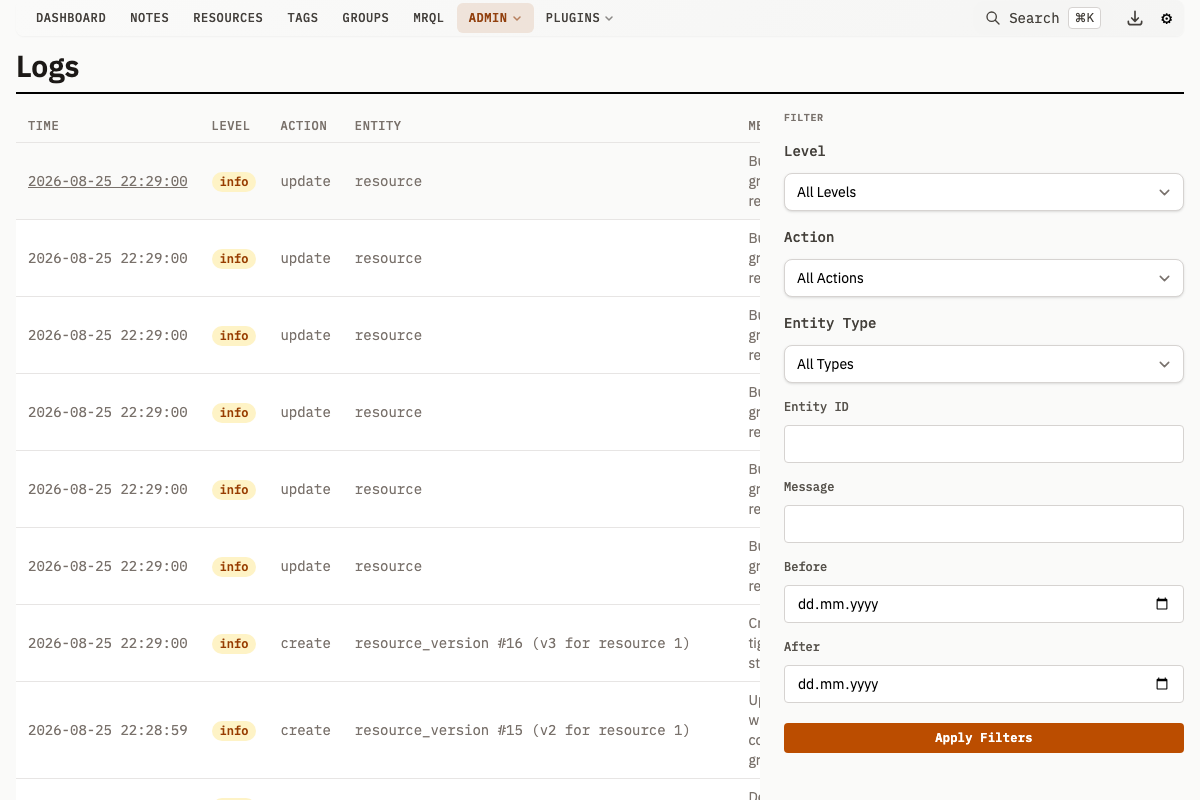
Log Entry Properties
| Property | Type | Description |
|---|---|---|
level | string | info, warning, or error |
action | string | create, update, delete, system, progress, plugin, reset, or error |
entityType | string | Entity kind: resource, note, group, etc. |
entityId | uint | ID of the affected entity (nullable) |
entityName | string | Name of the entity at the time of the action |
message | string | Human-readable description |
details | JSON | Additional context as a JSON object |
requestPath | string | HTTP path that triggered the action |
userAgent | string | Client user agent |
ipAddress | string | Client IP address |
Log Levels
| Level | Usage |
|---|---|
info | Normal operations -- entity creation, updates, deletions |
warning | Non-critical issues that may need attention |
error | Failed operations or system errors |
Log Actions
| Action | Description |
|---|---|
create | A new entity was created |
update | An existing entity was modified |
delete | An entity was deleted |
system | System-level events (startup, migration, configuration) |
progress | Long-running operation progress updates |
plugin | Plugin hook or action execution events |
reset | A runtime setting was reset to its default |
error | An error condition (e.g., emitted by the background hash worker) |
Viewing Logs
With -auth enabled, the activity log page and the /v1/log* endpoints are administrator-only. Editors, users and guests receive 403.
In the UI
Navigate to /logs to see a chronological list of all logged operations. Each entry shows the level, action, entity link, message, and timestamp, and links to /log?id=N for the full entry.
Entity detail pages also display recent log entries for that specific entity.
Filtering
Filter log entries by combining any of these parameters:
| Parameter | Type | Description |
|---|---|---|
level | string | Filter by level: info, warning, error |
action | string | Filter by action: create, update, delete, system, progress, plugin, reset, error |
entityType | string | Filter by entity kind |
entityId | uint | Filter by specific entity ID |
Message | string | Search by log message |
RequestPath | string | Filter by HTTP request path |
CreatedBefore | timestamp | Entries created before this time |
CreatedAfter | timestamp | Entries created after this time |
SortBy | string[] | Sort field(s) |
Configuration
Log Cleanup
Old log entries can be deleted automatically at startup:
| Flag | Env Variable | Default | Description |
|---|---|---|---|
-cleanup-logs-days | CLEANUP_LOGS_DAYS | 0 (disabled) | Delete entries older than N days on startup |
./mahresources -cleanup-logs-days=90 ...
Set to 0 (default) to retain all log entries indefinitely.
API Endpoints
List Log Entries
GET /v1/logs
| Parameter | Type | Description |
|---|---|---|
level | string | Filter by log level |
action | string | Filter by action type |
entityType | string | Filter by entity kind |
entityId | uint | Filter by entity ID |
Message | string | Search by log message |
RequestPath | string | Filter by HTTP request path |
CreatedBefore | timestamp | Entries before this time |
CreatedAfter | timestamp | Entries after this time |
SortBy | string[] | Sort field(s) |
page | int | Page number, 1-based (default 1). 50 entries per page. |
curl "http://localhost:8181/v1/logs?level=error"
{
  "logs": [
    {
      "id": 42,
      "createdAt": "2025-03-01T10:30:00Z",
      "level": "error",
      "action": "system",
      "entityType": "",
      "entityName": "",
      "message": "Failed to generate thumbnail",
      "details": {"resourceId": 1234},
      "requestPath": "/v1/resource/preview",
      "userAgent": "Mozilla/5.0",
      "ipAddress": "127.0.0.1"
    }
  ],
  "totalCount": 1,
  "page": 1,
  "perPage": 50
}
Get Single Log Entry
GET /v1/log
| Parameter | Type | Description |
|---|---|---|
id | uint | Log entry ID |
curl "http://localhost:8181/v1/log?id=42"
Get Logs for a Specific Entity
GET /v1/logs/entity
| Parameter | Type | Description |
|---|---|---|
entityType | string | Entity kind (e.g., resource, note) |
entityId | uint | Entity ID |
page | int | Page number, 1-based (default 1). 50 entries per page. |
curl "http://localhost:8181/v1/logs/entity?entityType=resource&entityId=123"
Returns log entries for the specified entity, most recent first, 50 per page. The response carries totalCount, page and perPage.
Troubleshooting
Log table growing too large
Enable automatic cleanup at startup:
./mahresources -cleanup-logs-days=30 ...
Missing log entries
Log writes are fire-and-forget -- if the database insert fails (e.g., disk full, connection lost), the error is printed to stdout but the original operation still succeeds. Check stdout output for write failures.