Resources
Every file in Mahresources is a Resource: images, documents, videos, or anything else. Each file is hashed for deduplication, gets automatic thumbnails where supported, and has version history.
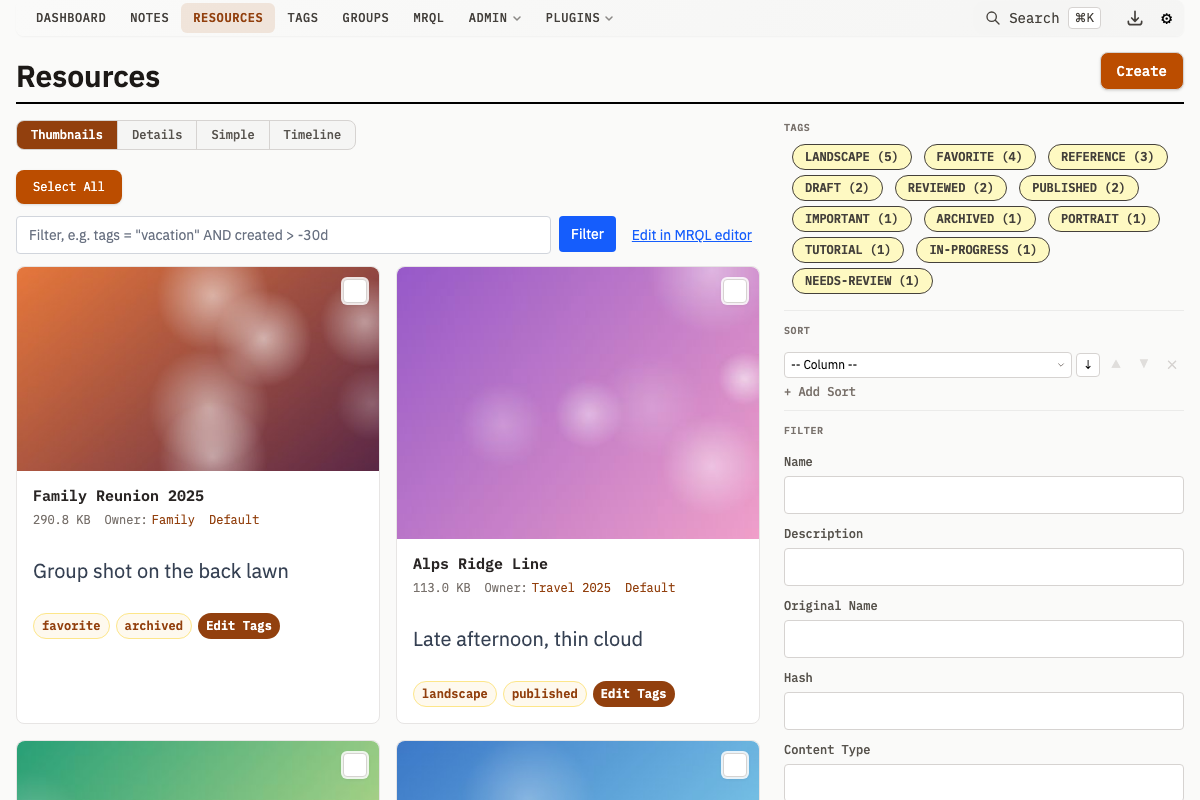
Resource Properties
| Property | Description |
|---|---|
guid | Stable UUIDv7 identity, unique and assigned on create; used to match entities across export and import |
name | Display name for the resource |
originalName | Original filename when uploaded |
originalLocation | Source URL or path if imported |
description | Free-text description |
meta | Arbitrary JSON metadata |
contentType | MIME type (e.g., image/jpeg) |
contentCategory | Content category string (e.g., image, video, document) |
category | Legacy category string |
fileSize | Size in bytes |
width, height | Dimensions for images and videos |
hash | Content hash for deduplication |
hashType | Hash algorithm used (SHA1) |
location | Storage path relative to the storage root |
storageLocation | Which alternative filesystem contains the file (nil = default) |
resourceCategoryId | Resource Category for typed presentation (not null, defaults to system default category ID 1) |
seriesId | FK to Series for shared metadata grouping |
ownMeta | Resource-specific metadata when in a Series (diff from Series meta) |
ownerId | FK to owner Group |
currentVersionId | ID of the active version (see Versioning) |
createdAt | Creation timestamp |
updatedAt | Last update timestamp |
Resource descriptions support @-mentions. Type @ in the description field to search and link to notes, groups, and tags. Mentioned entities are automatically added as relations when you save. See Mentions.
File Storage
Mahresources stores files on the filesystem and metadata in the database:
- Files are organized by hash for deduplication
- Multiple storage locations can be configured via alternative filesystems
- The
locationfield stores the path relative to the storage root - The optional
storageLocationfield specifies which filesystem contains the file
Alternative Filesystems
Configure multiple storage locations for:
- Separating different types of content
- Read-only archive storage
- Distributed storage across drives
Thumbnails and Previews
Mahresources generates thumbnails automatically for supported file types:
Image Thumbnails
- Generated on-demand when first requested for a given size
- Supports JPEG, PNG, GIF, WebP, BMP, TIFF natively; HEIC/AVIF via ImageMagick fallback; SVG via built-in rasterizer (oksvg/rasterx)
- Cached in the database as
Previewrecords for subsequent requests
Video Thumbnails
- Requires FFmpeg to be installed and configured
- Extracts a frame from the video at 1 second (with fallback to 0s)
- A background ThumbnailWorker pre-generates thumbnails for video resources
- Configure via
-ffmpeg-pathorFFMPEG_PATH
Document Thumbnails
- Requires LibreOffice for office documents
- Converts first page to image preview
- Configure via
-libreoffice-pathorLIBREOFFICE_PATH - Auto-detects
sofficeorlibreofficein PATH
Hash Calculation
Mahresources computes cryptographic hashes for integrity and deduplication:
Content Hash
- SHA1 hash of file contents
- Used for deduplication (same content = same hash)
- Enables detection of duplicate uploads
Perceptual Hashes (Images)
For image files, Mahresources computes three perceptual hashes from a single decode. The primary metric is the goimagehash Perception Hash (pHash), a DCT-based hash whose value is indexed in four chunk columns for fast database-side candidate lookup. Alongside it, the legacy imgsim Difference Hash (dHash) and Average Hash (aHash) are also stored. Similarity between two images is measured by the Hamming distance between their pHash values -- the number of differing bits. The dHash distance is a fallback for rows not yet migrated to the v2 pipeline, and the aHash distance feeds a secondary check that suppresses solid-color false positives.
Perceptual hashes detect visually similar images even across different resolutions, minor edits, format conversions, and color adjustments.
Image Similarity
A background worker compares perceptual hashes across all images and stores similarity pairs. When viewing an image, Mahresources displays visually similar images ranked by Hamming distance. For configuration options and details, see Image Similarity.
Resource Versioning
Mahresources tracks version history for each Resource. For details, see Versioning.
Version Properties
| Property | Description |
|---|---|
versionNumber | Sequential version number |
hash | Content hash for this version |
fileSize | Size of this version |
contentType | MIME type (may change between versions) |
width, height | Dimensions for this version |
location | Storage path for this version |
storageLocation | Which filesystem contains this version's file |
hashType | Hash algorithm used (defaults to SHA1) |
comment | Optional description of changes |
Version Workflow
- Upload a new file to an existing resource
- Previous content is preserved as a version
- New content becomes the current version
- Access any version through the version history
Series Membership
A Resource can belong to a Series -- a grouping of Resources that share common metadata (e.g., pages of a scanned document). The Series holds shared metadata, and each Resource stores only its unique differences in ownMeta. The effective meta is the merge of Series meta plus ownMeta (Resource wins on conflict). See Series.
Duplicate Detection
Upload deduplication is hash-based (SHA1). If a file with the same hash already exists, the outcome depends on the requested owner:
- Same owner (the requested owner matches the existing Resource's owner): any Tags, Notes, and Groups supplied with the upload are merged onto the existing Resource, then a
ResourceExistsErrorwith the existing Resource ID is returned. No new Resource is created. - No owner specified: a
ResourceExistsErroris returned and nothing is changed. - Different owner, already related: if the requested owner is already a related Group of the existing Resource, a
ResourceExistsErroris returned with no re-attach. - Different owner, not yet related: the requested owner is attached as a related Group on the existing Resource, and the existing Resource is returned (no error).
Deletion Behavior
Deleted files are backed up before the database record is removed, to /deleted/<storage-location>/{hash}__{id}__{ownerId}___{basename}, which prevents collisions and preserves context. <storage-location> is the resource's alternative-filesystem key, or the literal deleted for the default filesystem, and {ownerId} is nil when the resource had no owner. Files are only physically deleted from primary storage if no other Resources or versions reference the same hash.
Relationships
Resources connect to other entities in several ways:
Ownership
- A Resource can be owned by one Group
- The owner appears as the resource's parent
- Deleting the owner sets the resource's owner to NULL
Related Groups
- A Resource can be related to multiple Groups
- Appears in each group's "Related Resources" section
- Many-to-many relationship
Related Notes
- A Resource can be attached to multiple Notes
- Notes can reference resources as attachments
- Many-to-many relationship
Tags
- A Resource can have multiple Tags
- Tags enable cross-cutting organization
- Many-to-many relationship
Auto-Detect Rules
Resource Categories can define auto-detect rules that automatically assign a category when a resource is uploaded. The resource category field is always optional on the upload form. When omitted, the system matches the uploaded file's properties against all defined rules and picks the best match. If no rules match, the system default category is used.
Rule Format
The autoDetectRules field is a JSON object on the Resource Category:
{
  "contentTypes": ["image/jpeg", "image/png"],
  "width": {"min": 1920},
  "height": {"min": 1080},
  "priority": 10
}
Fields
| Field | Required | Description |
|---|---|---|
contentTypes | Yes | Array of MIME types to match (exact match) |
width | No | Image width in pixels (min, max, or both) |
height | No | Image height in pixels (min, max, or both) |
aspectRatio | No | Width/height ratio (min, max, or both) |
fileSize | No | File size in bytes (min, max, or both) |
pixelCount | No | Total pixels, width x height (min, max, or both) |
bytesPerPixel | No | File size divided by pixel count (min, max, or both) |
priority | No | Integer priority for tiebreaking (default 0, higher wins) |
Range fields use {"min": N}, {"max": N}, or {"min": N, "max": N}. At least one bound is required if the field is present.
Matching Behavior
- The
contentTypesfield must match exactly (no wildcards) - Dimension-based fields (width, height, aspectRatio, pixelCount, bytesPerPixel) are skipped when dimensions are unavailable (e.g., non-image files), rather than failing the match
- If multiple categories match, the winner is selected by: highest priority, then most fields evaluated (specificity), then lowest category ID
- If no rules match, the system default category is used
Examples
High-resolution photos:
{
  "contentTypes": ["image/jpeg", "image/png", "image/webp"],
  "width": {"min": 3000},
  "height": {"min": 2000},
  "priority": 10
}
Small icons:
{
  "contentTypes": ["image/png", "image/svg+xml"],
  "width": {"max": 256},
  "height": {"max": 256},
  "priority": 5
}
PDF documents:
{
  "contentTypes": ["application/pdf"]
}
Large video files:
{
  "contentTypes": ["video/mp4", "video/webm"],
  "fileSize": {"min": 104857600},
  "priority": 5
}
Setting via the UI
- Navigate to Resource Categories
- Create or edit a category
- Enter the JSON rules in the Auto-Detect Rules field
- Save (validation runs on save and rejects invalid rules)
API Operations
For full API details -- creating, querying, and bulk operations on Resources -- see API: Resources.