Note Blocks
Note Blocks provide a structured content system within Notes. Each block has a type, a string-based position for ordering, JSON content (edited in edit mode), and JSON state (modified while viewing).
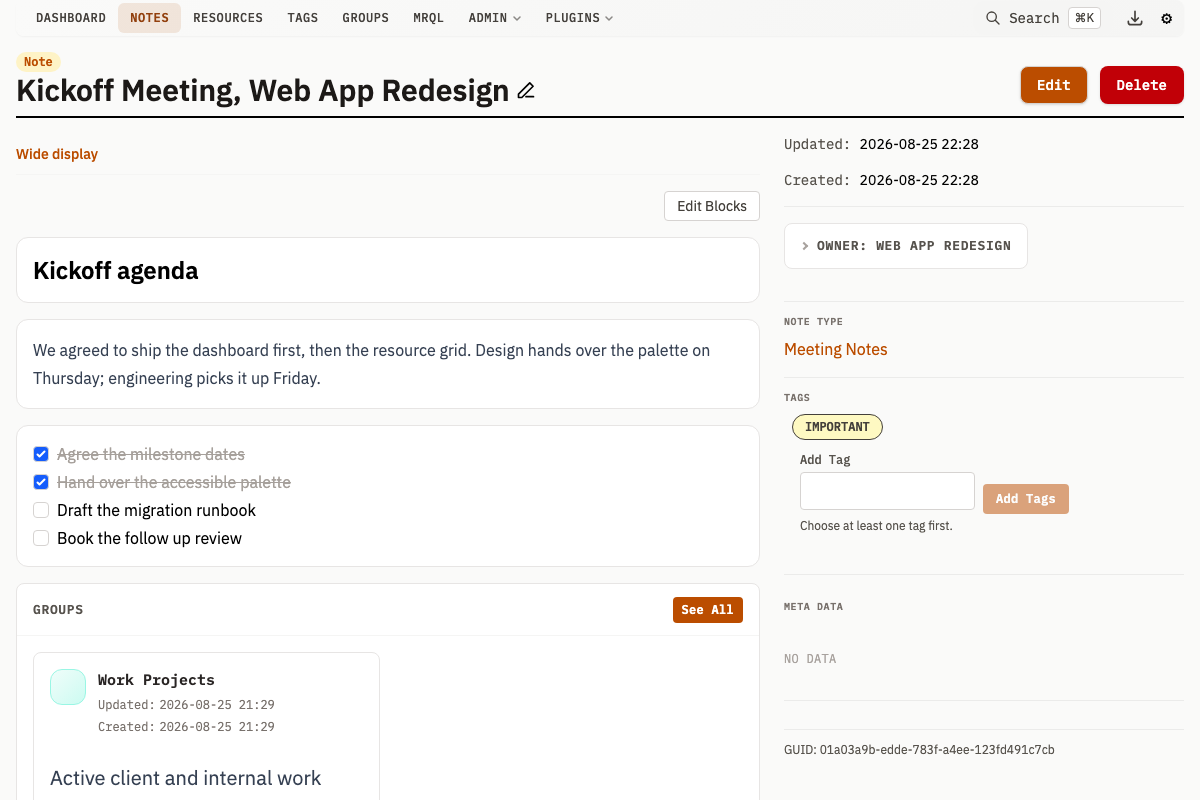
Block Properties
| Property | Type | Description |
|---|---|---|
type | string | Block type identifier |
position | string | Lexicographic ordering key (max 64 chars) |
content | JSON | Data edited in edit mode (defaults to {}) |
state | JSON | Runtime/UI state (defaults to {}) |
noteId | integer | FK to the parent Note |
createdAt | datetime | Creation timestamp |
updatedAt | datetime | Last update timestamp |
Content vs State
Blocks separate what you author from what changes during use:
- Content: Changed in edit mode. Example: a todo item's text, a heading's title, a table's query name
- State: Changed in view mode. Example: which todos are checked, the calendar's current view, a table's sort direction
This separation means users can interact with blocks (checking items, sorting tables) without entering edit mode.
Block Types
Eight built-in block types ship with Mahresources. Plugins can register additional types using mah.block_type() -- these appear with the prefix plugin:<plugin-name>:<type>.
Text
Rich text content. The first text block syncs bidirectionally with the Note's description field.
{"text": "This is a paragraph of text."}
Heading
Section heading with a configurable level (1-6, corresponding to h1-h6).
Content:
{"text": "Section Title", "level": 2}
State: Empty object {}
Divider
A horizontal separator line. Has no content or state.
Content: {}
State: {}
Gallery
A collection of Resources displayed as thumbnails. State controls the layout.
Content:
{"resourceIds": [1, 2, 3]}
State:
{"layout": "grid"}
layout:"grid"or"list"
References
A list of linked Groups displayed as cards.
Content:
{"groupIds": [10, 20, 30]}
State: Empty object {}
Todos
Interactive checklist. Content holds the items; state tracks which are checked. Each item needs a unique id.
Content:
{
  "items": [
    {"id": "a1b2", "label": "First task"},
    {"id": "c3d4", "label": "Second task"}
  ]
}
State:
{"checked": ["a1b2"]}
Table
Data table with two modes: manual data (columns/rows) or query-driven.
Manual mode:
{
  "columns": ["Name", "Size", "Type"],
  "rows": [["photo.jpg", "2.4 MB", "image/jpeg"]]
}
Columns can also be objects with id and label fields. Rows can be arrays of values or objects keyed by column IDs:
{
  "columns": [{"id": "name", "label": "Name"}, {"id": "size", "label": "Size"}],
  "rows": [{"name": "photo.jpg", "size": "2.4 MB"}]
}
Query mode:
{
  "queryId": 5,
  "queryParams": {"minSize": "1000000"},
  "isStatic": false
}
The queryId references a saved Query by ID. The queryParams object provides named parameters passed to the Query at execution time. Set isStatic to true to prevent automatic refresh.
State:
{"sortColumn": "Name", "sortDirection": "asc"}
Calendar
Calendar view from iCal sources (URL or stored Resource) with optional custom events.
Content:
{
  "calendars": [
    {
      "id": "work",
      "name": "Work Calendar",
      "color": "#3b82f6",
      "source": {"type": "url", "url": "https://calendar.example.org/work.ics"}
    },
    {
      "id": "local",
      "name": "Stored Calendar",
      "color": "#10b981",
      "source": {"type": "resource", "resourceId": 42}
    }
  ]
}
State:
{
  "view": "month",
  "currentDate": "2024-06-15",
  "customEvents": [
    {
      "id": "evt1",
      "title": "Team Meeting",
      "start": "2024-06-20T10:00:00Z",
      "end": "2024-06-20T11:00:00Z",
      "allDay": false,
      "calendarId": "custom",
      "location": "Room 301",
      "description": "Quarterly sync"
    }
  ]
}
state.view:monthoragendastate.customEvents: User-created events (max 500 per block, each withcalendarIdset to"custom"). Each event can include optionallocation(string) anddescription(string) fields.- ICS files are capped at 10MB. Recurring events (RRULE) are not supported.
- Every calendar needs a non-empty
id, andcolor, when given, must match#rgbor#rrggbb. - A
urlsource must usehttporhttps, checked when the block is saved and again when it is fetched. - A URL resolving to a loopback, link-local, RFC1918 or CGNAT address is denied unless the operator listed it in
-allow-private-fetch.
Position Ordering
Blocks use lexicographic string positions for ordering. Insert between existing blocks without renumbering:
| Position | Block |
|---|---|
a | First block |
b | Second block |
am | Inserted between first and second |
Positions are rebalanced automatically after a block is created and after a reorder commits, whenever any position string has grown past 8 characters. The rebalance endpoint triggers the same redistribution on demand.
Description Synchronization
The Note's description field and the first text block stay in sync:
- Editing the first text block updates
description - Editing
descriptionupdates the first text block - Deleting the first text block promotes the next text block
- Notes without blocks render
descriptiondirectly
API Operations
Block CRUD
| Method | Endpoint | Description |
|---|---|---|
GET | /v1/note/blocks?noteId={id} | List blocks for a Note (ordered by position) |
GET | /v1/note/block?id={id} | Get single block |
GET | /v1/note/block/types | List available block types |
POST | /v1/note/block | Create block (JSON body: noteId, type, position, content) |
PUT | /v1/note/block?id={id} | Update block content (JSON body: content) |
PATCH | /v1/note/block/state?id={id} | Update block state (JSON body: state) |
DELETE | /v1/note/block?id={id} | Delete block |
POST | /v1/note/block/delete?id={id} | Delete block (form alternative) |
Ordering
| Method | Endpoint | Description |
|---|---|---|
POST | /v1/note/blocks/reorder | Bulk update positions (JSON: noteId, positions map) |
POST | /v1/note/blocks/rebalance?noteId={id} | Redistribute position strings evenly |
Sub-Endpoints
| Method | Endpoint | Description |
|---|---|---|
GET | /v1/note/block/table/query?blockId={id} | Execute table block's saved Query |
GET | /v1/note/block/calendar/events?blockId={id}&start={date}&end={date} | Fetch calendar events (YYYY-MM-DD dates) |
GET | /v1/plugins/{pluginName}/block/render?blockId={id}&mode=view|edit | Render a plugin block type's HTML (see Custom Block Types) |
For full API examples and response formats, see API: Notes.