Relationships
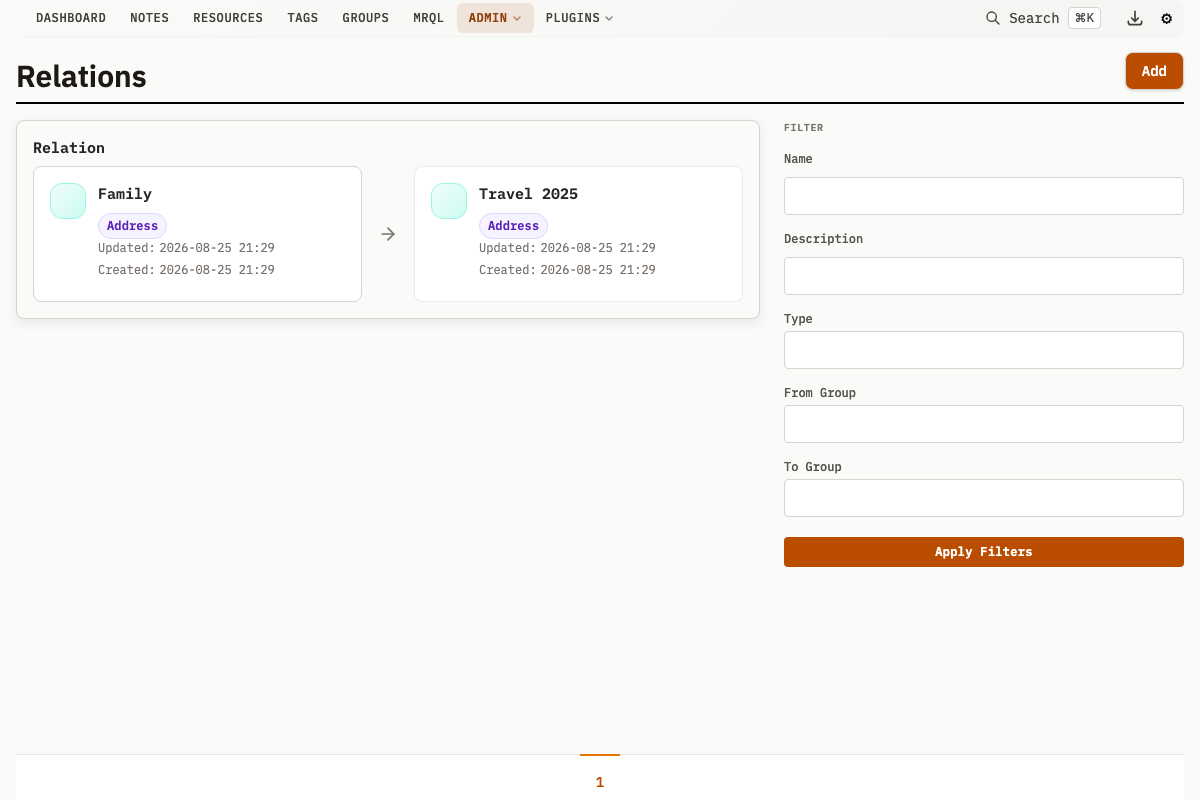
Typed relationships add meaning to connections between Groups beyond ownership or many-to-many associations. Each relationship is a directed edge with a named type, forming a navigable graph.
Relationship Types (RelationTypes)
Relationship Types define the kinds of connections that can exist between groups.
RelationType Properties
| Property | Description |
|---|---|
name | Name for the relationship type (unique per fromCategoryId/toCategoryId pair) |
description | Explanation of what this relationship means |
fromCategoryId | Required: the source group must be of this Category |
toCategoryId | Required: the target group must be of this Category |
backRelationId | Optional: FK to the inverse relationship type |
createdAt | Creation timestamp |
updatedAt | Last update timestamp |
Examples
| RelationType | From Category | To Category | Description |
|---|---|---|---|
| "works at" | Person | Company | Employment relationship |
| "employs" | Company | Person | Inverse of "works at" |
| "parent of" | Person | Person | Family relationship |
| "child of" | Person | Person | Inverse of "parent of" |
| "member of" | Person | Group | Membership |
| "located in" | Building | Location | Physical location |
Category Constraints
Every RelationType is bound to a source and a target Category. Both fromCategoryId and toCategoryId are required when creating a RelationType.
- fromCategoryId: only groups of this Category can be the source
- toCategoryId: only groups of this Category can be the target
When a Relation is created, both endpoint groups must have a Category assigned, and those categories must match the RelationType's fromCategoryId and toCategoryId. A mismatch, or a group with no Category, is rejected.
Examples:
- "works at" only makes sense from Person to Company
- "located in" goes from Building to Location
Because a RelationType is bound to its categories, deleting a Category cascades: every RelationType constrained to it (either direction) is deleted, all Relations of those types are deleted, and backRelationId pointers referencing them are cleared.
Back Relations (Inverse)
RelationTypes can specify their inverse:
"works at" <-> "employs"
"parent of" <-> "child of"
When creating a Relation with a back Relation Type defined, both directions are physically created:
- The forward Relation is created (A "works at" B)
- The inverse Relation is automatically created (B "employs" A)
When the ReverseName parameter equals the Name (e.g., "sibling of"), the Relation Type becomes its own inverse -- a single self-referencing back relation. This requires fromCategoryId and toCategoryId to be the same Category; the create is refused otherwise.
Relations
Relations are instances of RelationTypes connecting specific groups.
Relation Properties
| Property | Description |
|---|---|
name | Optional name for this specific relation |
description | Optional description |
fromGroupId | Source group |
toGroupId | Target group |
relationTypeId | Type of relationship |
createdAt | Creation timestamp |
updatedAt | Last update timestamp |
Creating Relations
POST /v1/relation
Content-Type: application/json

{
  "fromGroupId": 1,
  "toGroupId": 2,
  "relationTypeId": 3,
  "name": "Optional specific name",
  "description": "Additional context"
}
Constraints
- A group cannot have a relation to itself
- The combination of (fromGroupId, toGroupId, relationTypeId) must be unique
- Category constraints on the RelationType must be satisfied
Graph Navigation
Relations form a graph between groups:
John Smith (Person)
├── "works at" -> Acme Corp (Company)
├── "parent of" -> Jane Smith (Person)
└── "member of" -> Photography Club (Group)

Acme Corp (Company)
├── "employs" -> John Smith (Person)
├── "employs" -> Bob Jones (Person)
└── "located in" -> New York (Location)
Viewing Relations
On a group page, relations are displayed in both directions:
Outgoing Relations (from this group):
- Shows all relations where this group is the source
- Grouped by RelationType
Incoming Relations (to this group):
- Shows all relations where this group is the target
- Each one is labelled with its own Relation Type. A defined inverse produces a separate Relation, which appears under the other group's outgoing relations rather than renaming this one
Querying Relations
Find Groups whose Category is a Relation Type's from-side or to-side Category, that is Groups eligible for that side of the relation. It does not select Groups that actually participate in a relation, so a Group with no relations at all still matches. Use RelationSide to pick the side (0 = from side, non-zero = to side):
GET /v1/groups?RelationTypeId=1&RelationSide=0
Use Cases
People and Organizations
Model employment and membership:
Person "works at" Company
Person "member of" Organization
Person "studied at" University
Family Trees
Model family relationships:
Person "parent of" Person (back: "child of")
Person "sibling of" Person (back: "sibling of")
Person "married to" Person (back: "married to")
Project Management
Model project structure:
Project "owned by" Team
Task "assigned to" Person
Task "blocks" Task (back: "blocked by")
Geographic Hierarchy
Model locations:
Building "located in" City
City "located in" Country
Event "held at" Venue
API Operations
For full API details -- creating relation types, setting up inverse pairs, creating relations, and querying -- see API: Other Endpoints.
Tips
- Use verb phrases for Relation Type names ("works at", not "employment") so Relations read naturally: "John Smith works at Acme Corp"
- Define inverses for bidirectional navigation
- Use Category constraints to prevent nonsensical Relations